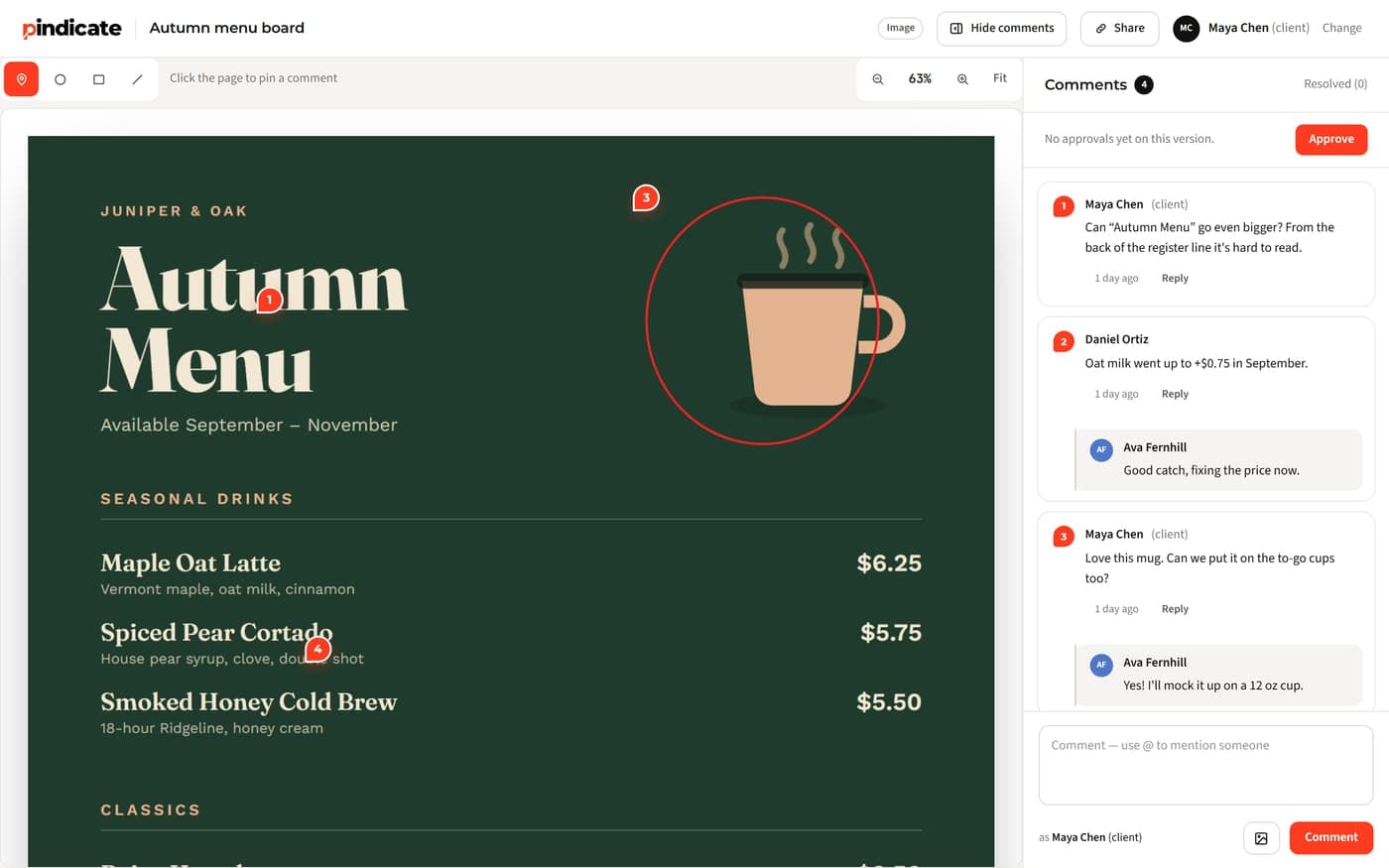
Free video review software compared: the exact free plan limits for 7 tools, which cap you'll hit first, and which let clients comment without an account.
Table of contents
Free plans checked on each vendor's pricing page on October 14, 2026. Pindicate is on this list and we make it.
TL;DR: Seven video review tools have a free plan you can stay on: Pindicate, Frame.io, ReviewStudio, Krock.io, SyncSketch, Filestage and Ziflow. Each one caps something different: projects, active reviews, storage, files per month or how long a proof stays open. Pick the one whose cap you won't hit this month, and check that clients can comment without an account.
The short version:
- Most room for client work: Pindicate or ReviewStudio (3 active reviews, 5 GB)
- Already editing in Premiere: Frame.io (2 members, 2 GB, 2 projects)
- Animation and VFX dailies: SyncSketch (5 users, 2 projects)
- Biggest team on a free plan: Filestage (10 seats), if one project at a time is enough
- Trial, not free: Wipster
A client wants changes to a 90-second cut. You don't want to pay $15 a seat just to collect their notes, and you definitely don't want another email that says "around the middle, the music is weird." So you look for free video review software, and every vendor page says "free" in a slightly different way.
Here, free means a plan you can stay on, not a 14-day trial. I checked every free plan below on the vendor's own pricing page on October 14, 2026, and wrote the limits down exactly as they're listed.
What counts as video review software?
Video review software is a tool where you upload a cut, send a link, and the reviewer leaves notes tied to exact moments in the video. It replaces emails full of "at 0:42 the logo is too small."
Video review software lets a reviewer comment at an exact timestamp, and often draw on the paused frame, through a link you send. Your notes arrive in one list, in time order, attached to the moment they're about.
For free use, three things matter more than the feature list:
- Timestamped comments. Every note lands at the second it's about.
- A link the client opens without signing up. If your client has to make an account, some of them won't.
- It works on a phone. Plenty of clients watch your cut on the train.
If you also send designs and PDFs for sign-off, our list of the best proofing software for designers covers those formats too.
The free plans side by side
The table shows each free plan's limits as they appear on the vendor's pricing page, plus the one cap you're most likely to hit first.
| Tool | Free plan (as listed) | The cap that bites | Clients need an account? | First paid step |
|---|---|---|---|---|
| Pindicate | 3 active reviews, 5 GB, no per-file size limit | 3 active reviews | No | $12/mo flat, or $96/yr |
| Frame.io | Up to 2 members, 2 GB, up to 2 projects | 2 projects | No | $15 per member/mo |
| ReviewStudio | 1 user, unlimited guests, 3 active reviews, 5 GB | 3 active reviews | No | $15 per user/mo |
| Krock.io | 1 user, 2 GB, 2 projects, unlimited reviewers | 2 projects | Not stated | $10 per user/mo |
| SyncSketch | Up to 5 users, 2 projects, 1 GB, 2 GB uploads a month | 1 GB storage | Not stated | $9 per user/mo, billed yearly |
| Filestage | 10 seats, 2 GB, 1 active project, 5 new files a month | 5 new files a month | No | $199/mo |
| Ziflow | 2 GB, unlimited proofs and reviewers, proofs open for 60 days | 60 days | No | Not listed |
Checked on each vendor's pricing page on October 14, 2026. "Not stated" means the pricing page doesn't say.
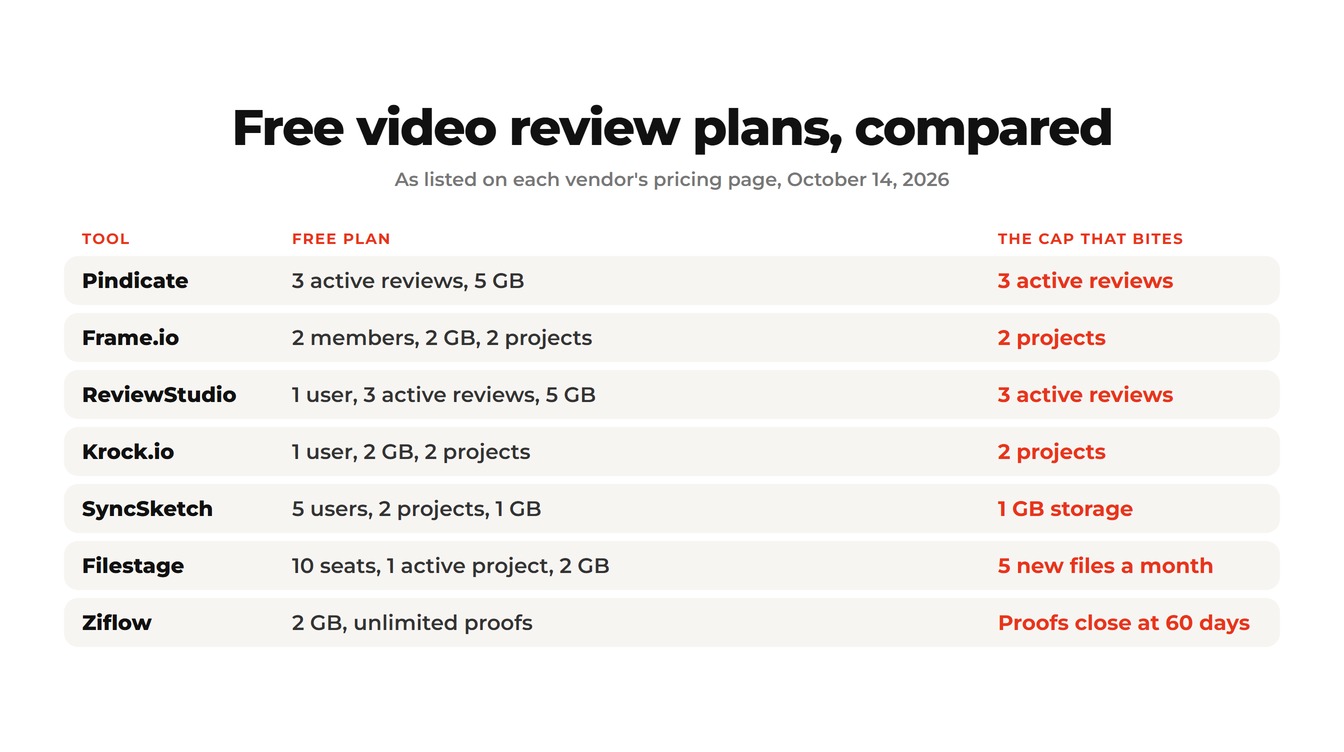
Reality Check: "Unlimited reviewers" shows up on almost every pricing page. It's rarely the limit that stops you. Read the cap column first, because that's the one you'll run into in week two.
The 7 free video review tools
Each tool below gets the same five things: what it is, its free plan, what it's good at, where the free plan falls short, and who it fits.
1. Pindicate: free client video review with no account
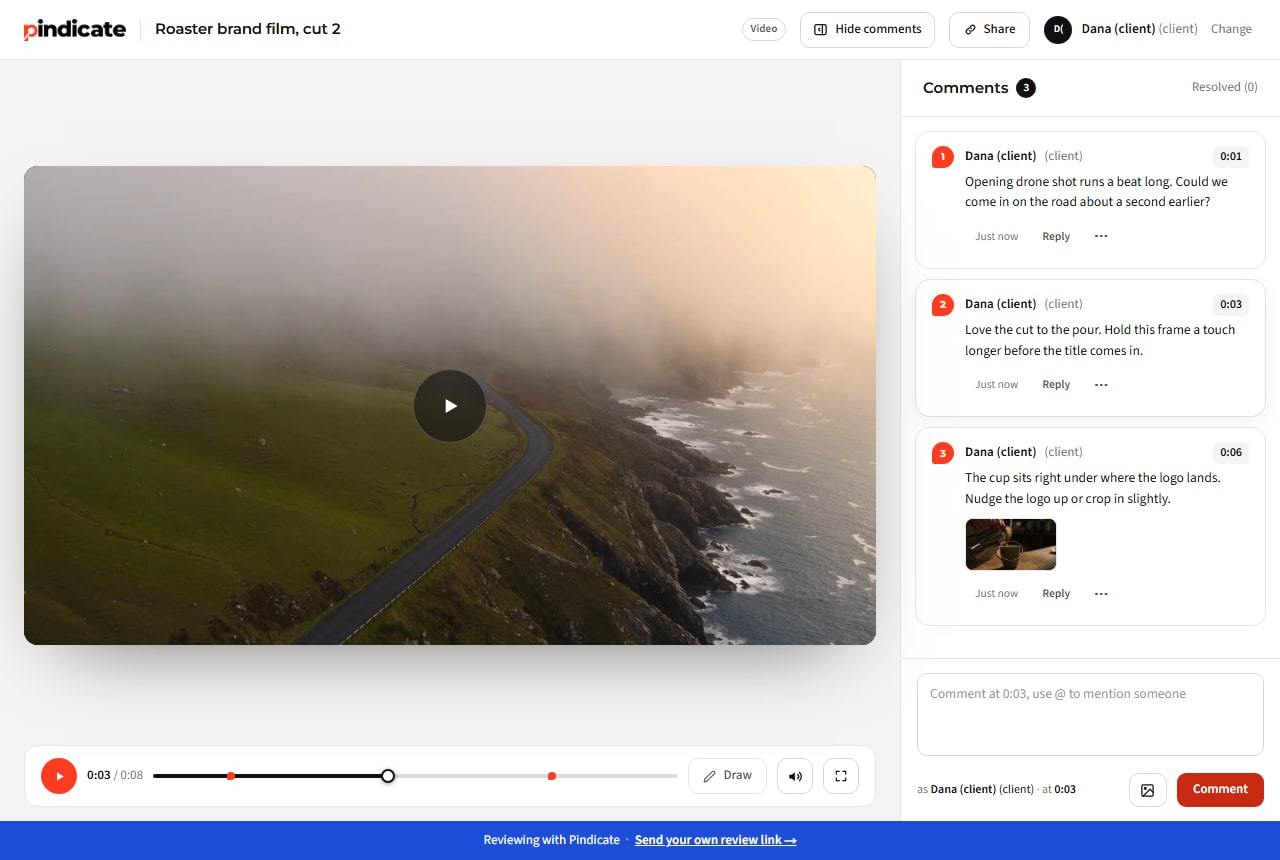
Pindicate is a review tool built for sending work to clients, and video is one of the formats it handles. You upload a cut, send the link, and your client types their name and starts commenting at the exact second.
Free plan: 3 active reviews at a time and 5 GB of storage, with no per-file size limit. Clients comment without an account, on a laptop or a phone.
Good at: client rounds. Comments sit at their timestamp, clients can pause and draw on the frame with the Draw tool, and on a phone the comment box keeps the timestamp. Pro adds versions on the same link, approvals and reminders for $12 a month flat, with up to 5 teammate logins.
Where the free plan falls short: 3 active reviews is tight if you juggle many clients. Pindicate also doesn't pin comments to a spot on the video picture itself; you get the timestamp plus a drawing. And there's no Premiere or Resolve panel, so you upload from the browser.
Fits: freelance editors and small studios sending cuts to clients. Pindicate for video editors shows the whole flow.
Pro Tip: When a client signs off, archive the review to free one of your 3 active slots. The link still opens for them, read-only, so nothing breaks.
2. Frame.io: free if you already edit in Premiere
Frame.io is Adobe's video review platform, and it's the tool most editors already know.
Free plan: up to 2 members, 2 GB of storage and up to 2 projects, plus Camera to Cloud and transcription and captions. Pro is $15 per member a month.
Good at: working inside Premiere Pro. If your edit lives in Adobe, comments flow back to your timeline.
Where the free plan falls short: 2 projects and 2 GB fill up fast. A few 4K cuts, or a third client, and you're paying per member. Here's what Frame.io costs after the free plan.
Fits: solo editors in the Adobe stack with one or two live projects. If you're weighing a switch, there's a fuller list of Frame.io alternatives.
3. ReviewStudio: free plan with unlimited guests
ReviewStudio is an online proofing tool that handles video next to designs and documents.
Free plan: 1 user at $0, unlimited guests, 3 active reviews and 5 GB. It lists MP4, MOV, ASF and ProRes video. Paid plans start at $15 per user a month, or $144 per user a year.
Good at: mixed work. If one client sends you a video one week and a brochure the next, it covers both.
Where the free plan falls short: one user. The moment a second editor needs to upload, you're on a per-user plan.
Fits: a solo editor who wants the same free room as Pindicate and a broader proofing toolkit.
Want to see the reviewer's side first? Open the sample video review. No account, and it works on a phone.
4. Krock.io: free for one editor
Krock.io is a review tool aimed at animation and production pipelines, with a storyboard tool built in.
Free plan: 1 user, 2 GB, 2 projects, unlimited reviewers and 1 workspace, plus 50 AI tokens. Pro is $10 per user.
Good at: pre-production. Storyboards and video review in one place suit animation work.
Where the free plan falls short: 2 projects and 2 GB. The pricing page also doesn't say whether reviewers need an account, so test the link with a friend before a client sees it.
Fits: a solo animator or storyboard artist.
5. SyncSketch: free for animation and VFX dailies
SyncSketch is built for frame-by-frame review in animation, games and VFX, with drawing over the video.
Free plan: the Light plan is free for up to 5 users, with 2 projects, 1 GB of cloud storage and 2 GB of uploads a month. Indie is $9 per user a month, billed yearly.
Good at: small teams reviewing shots together, which is why it allows 5 users on free.
Where the free plan falls short: 1 GB of storage is the smallest on this list. Long client cuts in high resolution won't fit for long.
Fits: a small animation or VFX team doing dailies with short clips.
6. Filestage: free for a team, one project at a time
Filestage is review and approval software built for marketing teams, with video alongside other files.
Free plan: 10 seats, 2 GB, 1 active project, 5 new files a month and 2 reviewer groups. It's free with no time limit after a 14-day trial. Starter is $199 a month.
Good at: structured approval rounds with groups of reviewers.
Where the free plan falls short: 5 new files a month. A cut, two revisions and a teaser for one client already uses 4 of them. The first paid plan is priced for a team of 10.
Fits: a marketing team testing approval rounds on one project before it buys.
7. Ziflow: free, but proofs close after 60 days
Ziflow is online proofing for larger teams. Its video review takes comments down to the second.
Free plan: 2 GB, unlimited proofs and unlimited reviewers. A user license is only needed to create proofs. Paid plans start with a free trial, and the pricing page no longer lists their prices.
Good at: proof workflows for agencies, if you later move to a paid plan.
Where the free plan falls short: proofs on the free plan can only be opened for 60 days.
Watch Out: A proof that disappears after 60 days is fine for a quick social cut. It's a problem for anything a client may come back to, like a brand film they reopen next quarter.
Fits: a team trying Ziflow before a sales conversation.
Not free, or not clearly free
Some popular video review tools only offer a trial, or put review inside a paid plan.
- Wipster: a free trial with no card required, but no free plan. Paid plans start at $9.95 a month on annual billing, or $11.95 month to month.
- Vimeo: the free plan has 1 seat and 1 GB, with no review tools. Review starts on Starter, which is $12 a month billed yearly for 1 user and 2 TB. Reviewers can comment as guests.
- Dropbox Replay: Dropbox Basic users get Replay "with limited features". The full Replay add-on is $10 per user a month billed yearly, or $12 month to month, and it needs a Dropbox Plus plan or higher.
Key Insight: A trial is a demo. Plan around the free plan's caps, not the trial's, because the trial ends right when your client's second round arrives.
Which free plan's cap will you hit first?
Match the cap to how you actually work. The right free plan is the one whose limit you won't reach this month.
| How you work | The cap to watch | Best free fit |
|---|---|---|
| Many small clients at once | Active reviews or projects | Pindicate or ReviewStudio (3 active reviews) |
| A few long 4K cuts | Storage | Pindicate or ReviewStudio (5 GB is the most on any free plan here) |
| A team of 3 to 5 editors | Members or seats | SyncSketch (5 users), Filestage (10 seats, 1 project) |
| Work a client may reopen months later | How long proofs stay open | Avoid Ziflow's free plan (60 days) |
| Clients who review on their phones | Phone review | Test the link on your own phone first |
Quick Win: Before you commit, upload one real cut and open the link on your phone as if you were the client. A two-minute phone test tells you more than any feature list.
The free workarounds, and why they break
You can collect video feedback without any review tool. It just costs you time in every round.
- An unlisted YouTube video: clients can leave comments with timestamps, but they need a Google account to comment, and anyone with the link can read the notes. There's no drawing on the frame, and you wait for YouTube to process each new version.
- A Drive or Dropbox link plus an email: it works, but notes come back as "at about 1:10, the bit with the cup," spread across three emails. You rebuild the timeline yourself every round.
Both work for one round with one client. Once there are two clients and three versions, a free review plan is less work than the workaround.
Frequently Asked Questions
Is there a free video review tool?
Yes. Seven video review tools have a free plan you can stay on: Pindicate and ReviewStudio (3 active reviews, 5 GB), Frame.io (2 members, 2 GB, 2 projects), Krock.io (1 user, 2 projects), SyncSketch (5 users, 1 GB), Filestage (1 active project, 5 new files a month) and Ziflow (proofs open for 60 days). Each caps something different, so match the cap to your workload.
What's the best free Frame.io alternative?
It depends on the work. For client video review, Pindicate and ReviewStudio give the most free room, with 3 active reviews and 5 GB each, and clients comment without an account. For animation dailies, SyncSketch allows 5 users on its free plan. If you live in Premiere, staying on Frame.io's free plan may still be simplest.
Can clients review a video without an account?
On most of these tools, yes. Pindicate, Frame.io, ReviewStudio, Filestage and Ziflow all let reviewers comment through a link without making an account. Vimeo's paid review tools allow guest comments too. Krock.io and SyncSketch don't say on their pricing pages, so test the link before you send it to a client.
Can I draw on the video frame for free?
Some free plans allow it. On Pindicate's free plan, a reviewer can pause and draw on the frame with the Draw tool. Ziflow says its reviewers can comment, mark up and annotate video. SyncSketch is built around drawing over video. For the others, check the feature list for the free plan before you rely on it.
Is there a free AI video review tool?
A few free plans include some AI features. Frame.io's free plan lists transcription and captions, and Krock.io's free plan includes 50 AI tokens. Neither replaces your client's notes. AI can transcribe dialogue, but it can't tell you the client wants the logo a second earlier.
What's the difference between a free plan and a free trial?
A free plan is something you can stay on with limits, like 3 active reviews or 2 projects. A free trial is the paid product for a set number of days. Wipster offers a trial only. Filestage gives you a 14-day trial, then drops you to its free plan. Plan around the free plan's limits.
Try the client's side first
Open the sample video review on your phone and leave a comment at a timestamp. It takes 30 seconds and needs no account.
If it fits how you work, Pindicate's free plan covers 3 active reviews and 5 GB with no card. Upload your next cut, send one link, and read every note at the second it's about.