The best proofing software for freelance designers and small studios, compared by price at 1, 3 and 5 people, free plans and client access. Checked October 2026.
Table of contents
- What is online proofing software?
- Who should skip this list
- What to look for in proofing software
- How the best proofing software compares
- The 8 best online proofing tools, by use case
- Creative proofing beyond PDFs: video, websites and docs
- Flat price or per user: what it costs at your size
- Do clients need an account?
- How to choose
- Frequently Asked Questions
- Try the flat-price option
Prices checked on each vendor's pricing page on October 8, 2026. Pindicate is on this list and we make it.
TL;DR: The best proofing software for a freelancer or small studio charges a flat price, lets clients comment without an account, and handles every format you send. Pindicate ($12 flat), ReviewStudio (free plan, $15 per user) and Approval Studio ($60 for 5 users) fit most small teams. Big agencies fit Filestage, Ziflow or PageProof.
Pick by your situation:
- Solo or 2 to 5 people, every format, one flat price: Pindicate
- A usable free plan with unlimited guests: ReviewStudio or Pindicate
- Packaging, labels or print artwork with compare modes: Approval Studio or GoVisually
- A marketing team of 10 with formal approval rounds: Filestage
- An agency of 15 or more that wants workflow stages: Ziflow or PageProof
- A video editor who lives in Premiere Pro: Frame.io
Proofing software is where clients review and approve designs, videos and web pages. It is not a grammar checker. If you searched for a tool that fixes typos, this isn't that list.
Here's the problem it solves. A logo round goes out by email on Monday. By Wednesday the feedback is in three email threads, one WhatsApp voice note and a screenshot someone marked up in their phone's photo app. Nobody can say which version the client approved, including the client.
I've tried most of the tools below while building Pindicate, so one disclosure up front: Pindicate is ranked #1 here for one specific job, flat-price proofing for small teams, and I say where it falls short. The other seven are ranked by what each one is best at, not by quality.
What is online proofing software?
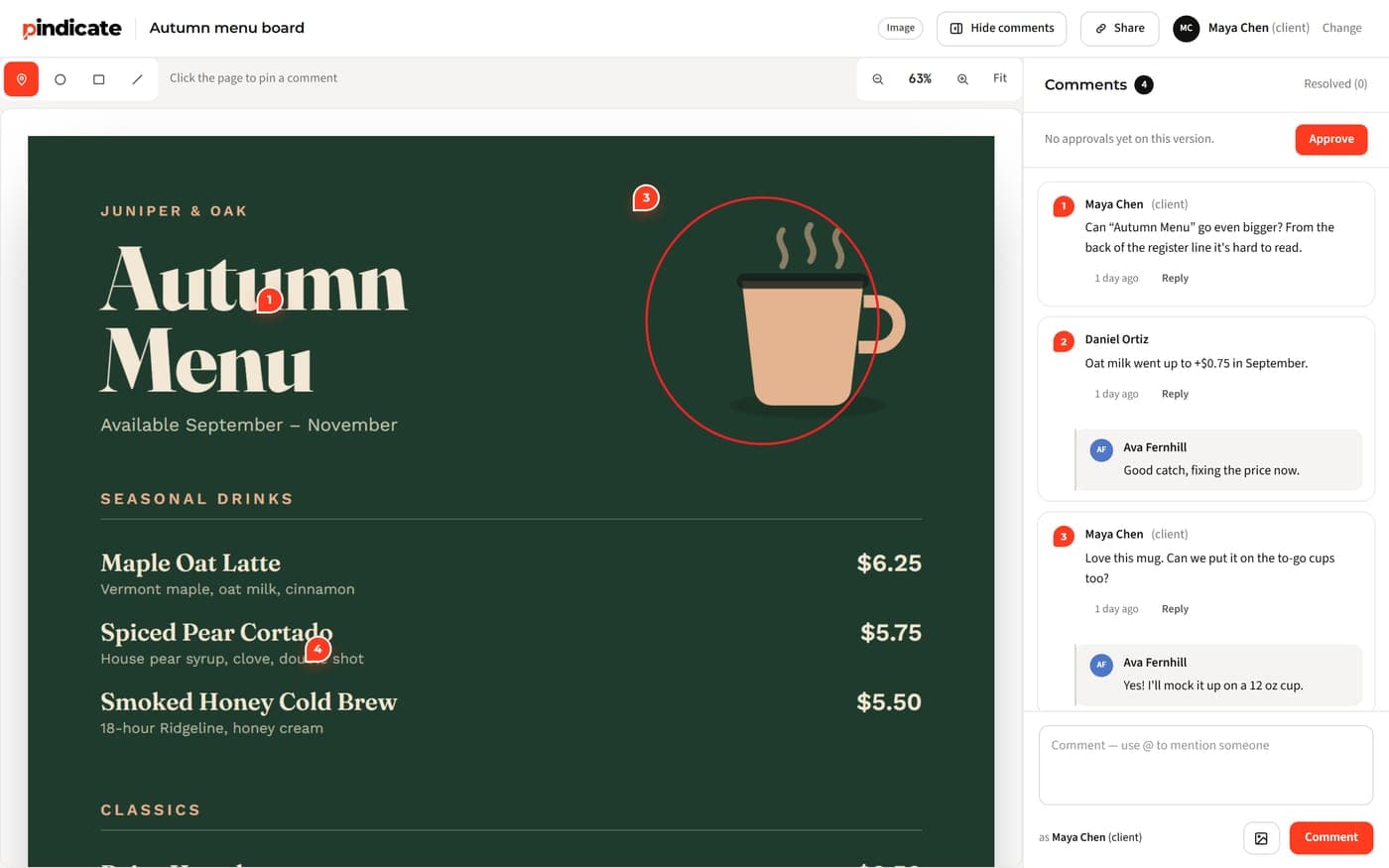
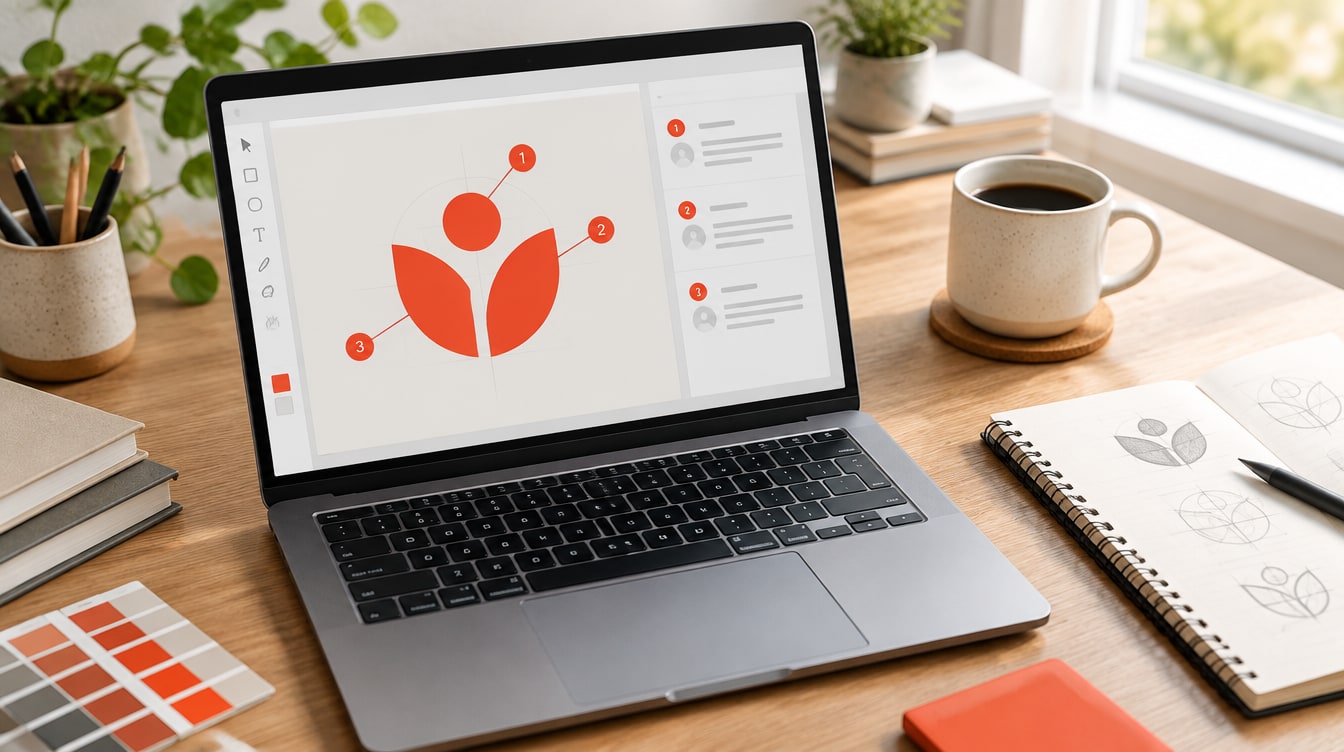
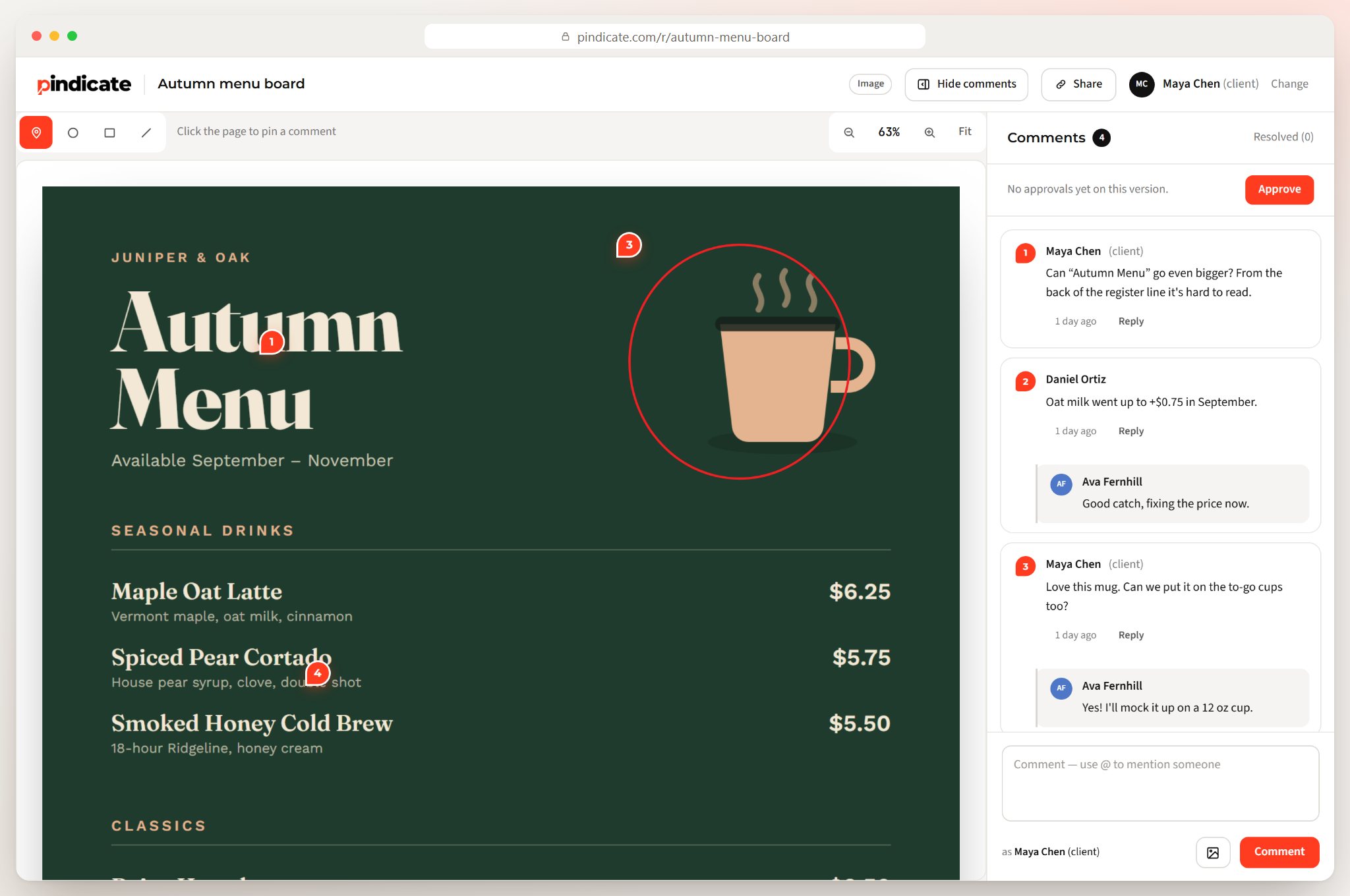
Online proofing software gives you a link where clients view a design, video, PDF or web page, leave comments pinned to the exact spot, and approve it. It replaces email chains, marked-up screenshots and the "which file is current?" message.
Online proofing software: a web tool that collects client feedback and approval on creative work, on the work itself, in one place. It is not proofreading software (grammar and spelling) and it is not photo proofing (galleries where clients pick the shots they want printed).
The payoff is small and daily. Every comment sits on the thing it's about. There's a record of who approved what and when. And when the client says "I never asked for that", you can open the link and look.
Reality Check: nearly every tool on this list lets clients review without an account. Don't pick a tool for that reason alone. Pick it on pricing model, formats and what the free plan caps.
Who should skip this list
Three kinds of searcher land here by mistake, and each has a better place to go.
- Photographers who want clients to pick favorites from a gallery: that's photo proofing. Gallery tools do it; the tools below don't.
- Print shops that need color-managed soft proofs and a logged sign-off per job: look at print-specific tools. Approval Studio and GoVisually are the closest on this list.
- Writers who want grammar checking: that's proofreading software, a different category.
Client proofing software for designers means feedback on the work itself, not picking favorites from a gallery. Everything below is built for that.
What to look for in proofing software
Five things decide it for a small studio: pricing model, free-plan caps, formats, client access, and how much workflow you actually need.
- Per user or flat? Per-user prices triple at 3 people. The cost table below shows it in dollars.
- What does the free plan cap? Active reviews, projects, storage or days. Each tool caps something different.
- Formats. PDFs and images are table stakes. Video, live websites and Office files are not.
- Client access. A link with a name field, a guest link with an optional password, or an invited reviewer.
- Workflow weight. Approval stages, checklists and automations help a 10-person marketing team. They slow down a freelancer.
Watch Out: "unlimited reviewers" is about clients. The number that costs money is users, the people who upload and manage. Count those before you compare prices.
How the best proofing software compares
The three tables below cover the eight tools at a glance, what they cost at 1, 3 and 5 people, and what each free plan actually gives you.
Table 1: at a glance
| Tool | Best for | Starting paid price | Pricing model | Free plan | Client account needed | Video | Live websites |
|---|---|---|---|---|---|---|---|
| Pindicate | Flat price, every format, small teams | $12/mo | Flat | Yes | No | Yes | Yes |
| ReviewStudio | Best free plan, unlimited guests | $15/user/mo | Per user | Yes | No | Yes | Yes |
| Approval Studio | Packaging and print artwork | $60/mo (5 users) | Flat per team | No (14-day trial) | No | Yes | Yes |
| GoVisually | CPG and label compliance | $16/user/mo (annual) | Per user | No (trial) | No | Pro plan only | Not stated |
| Filestage | Marketing teams with approval rounds | $199/mo (10 seats) | Flat per team | Yes | No | Yes | Not stated |
| Ziflow | Agencies with workflow stages | $199/mo (15 users, annual) | Flat per team | Yes | No | Yes | Not stated |
| PageProof | Agencies that want unlimited everything | $249/mo | Flat per team | Not stated | Not stated | Yes | Not stated |
| Frame.io | Video editors in Premiere Pro | $15/member/mo | Per member | Yes | No | Yes | No |
"Not stated" means the vendor's pricing page doesn't say. We don't guess.
Table 2: what it costs at your size
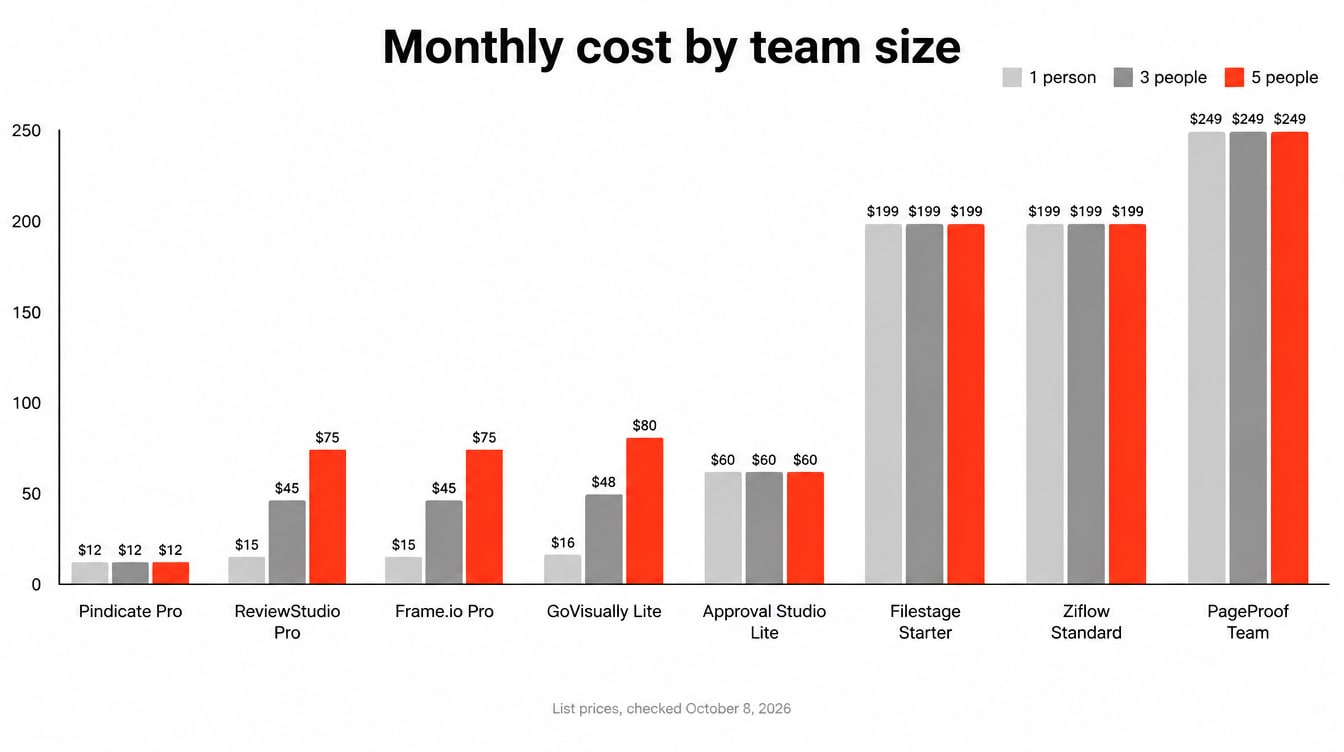
| Tool | Pricing model | 1 person | 3 people | 5 people | Notes |
|---|---|---|---|---|---|
| Pindicate Pro | Flat | $12 | $12 | $12 | Owner plus up to 5 teammate logins included |
| ReviewStudio Pro | Per user | $15 | $45 | $75 | Monthly billing; $12/user on annual |
| Frame.io Pro | Per member | $15 | $45 | $75 | Pro caps at 5 members |
| GoVisually Lite | Per user | $16 | $48 | $80 | Annual billing; about $20/user monthly; no video on Lite |
| Approval Studio Lite | Flat, 5 users | $60 | $60 | $60 | |
| Filestage Starter | Flat, 10 seats | $199 | $199 | $199 | |
| Ziflow Standard | Flat, 15 users | $199 | $199 | $199 | Billed yearly |
| PageProof Team | Flat | $249 | $249 | $249 | Unlimited reviewers |
List prices, checked October 8, 2026 on each vendor's pricing page. Per-user rows use monthly billing unless noted; most tools discount annual billing. Free plans not shown.
Table 3: free plans
| Tool | Free plan | The cap that bites |
|---|---|---|
| Pindicate | Yes | 3 active reviews, 250 MB per video |
| ReviewStudio | Yes | 3 active reviews total, 5 GB |
| Ziflow | Yes | 2 users, 2 GB, proofs viewable for 60 days |
| Filestage | Yes | 1 active project, 2 GB |
| Frame.io | Yes | 2 members, 2 GB |
| GoVisually | No (trial only) | |
| Approval Studio | No (14-day trial) | |
| PageProof | Not stated |
Pro Tip: compare on annual pricing if you'll stay a year. ReviewStudio drops to $12 a user and Pindicate drops to $8 a month ($96 a year) on annual billing.
The 8 best online proofing tools, by use case
Each entry starts with what the tool is best for, then the price, then one real strength and one real limit. Every price links to the vendor's own pricing page.
1. Pindicate (our product): best flat price for freelancers and small studios
Best for: one person or a studio of 2 to 5 who send more than PDFs and want one price.
Pindicate is a client feedback tool for designers, studios and video editors. You upload a file or paste a URL, send the link, and clients comment on the exact spot without signing up.
The free plan covers 3 active reviews. The Pro plan is $12 a month or $96 a year, flat, and includes up to 5 teammate logins. There's no per-seat line on the bill.
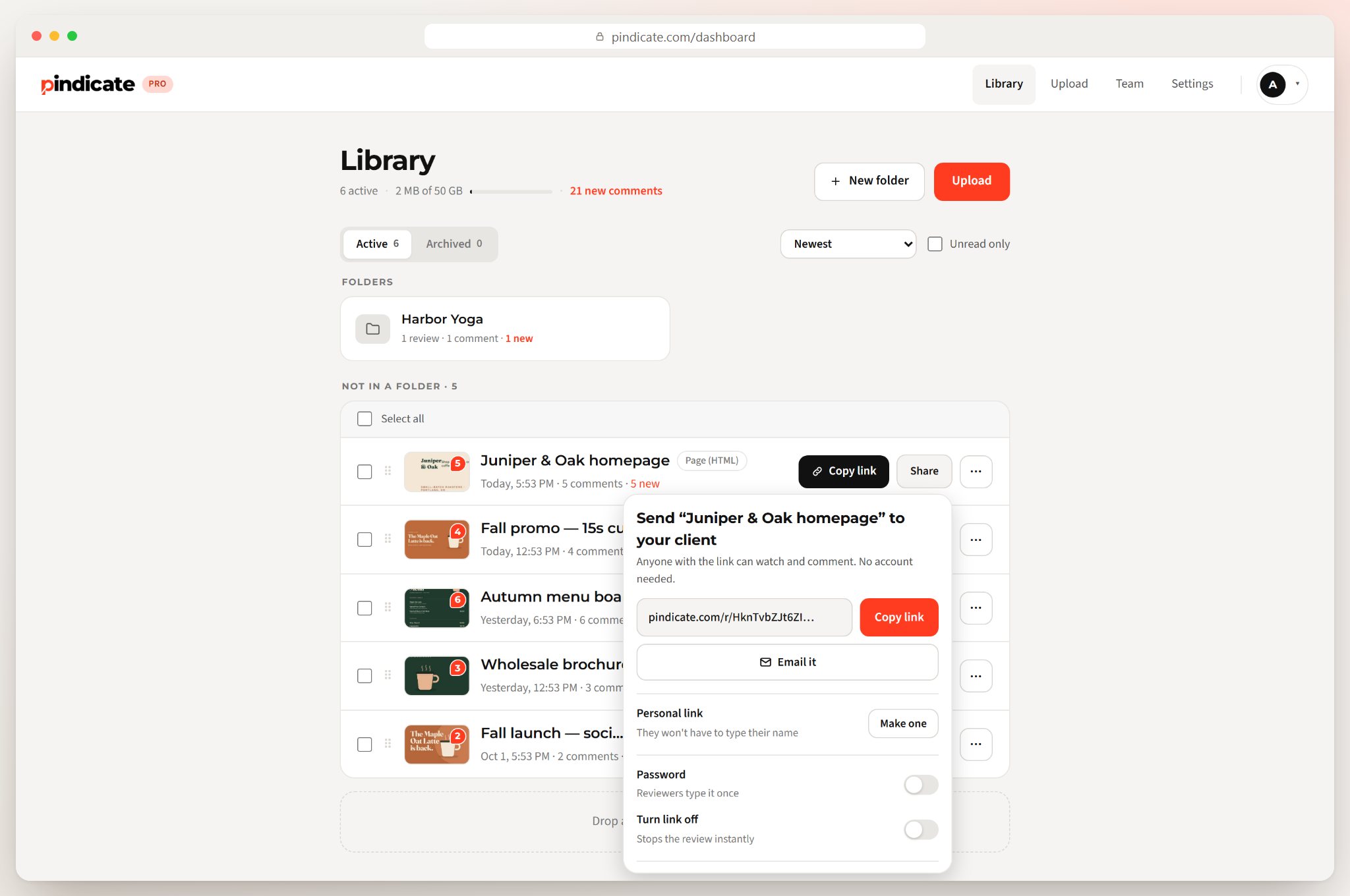
What it does well: every format in one place. Video, audio, images, PDFs, live websites, HTML files, Word, Google Docs and Slides, and emails all get the same pinned comments. Clients type a name and comment. Pro adds versions on the same link, client approvals and automatic reminders. You can open a sample review to see the client side, or read a walkthrough of Pindicate.
Where it falls short: video is capped at 2 GB per file on Pro, so long raw footage may not fit. There's no Adobe plug-in, no side-by-side compare mode, no barcode check and no print color tools. And it's a newer, smaller company than most of the others here.
See how freelancers use Pindicate for the day-to-day flow.
Try it with your own file. Upload on the homepage and you'll have a review link in about 10 seconds, no signup. Try Pindicate free.
2. ReviewStudio: best free plan with unlimited guests
Best for: a small team that wants a real free tier and a wide format list.
ReviewStudio is an online proofing tool with a free plan that allows unlimited users, 3 active reviews in total and 5 GB. Pro is $15 per user a month, or $144 per user a year, with 10 active reviews per user and 25 GB per user. Guests are unlimited on every plan and open reviews from a link, with an optional password.
What it does well: the format list is one of the longest here. Video including ProRes, HTML as a ZIP or live URL, audio, PSD, Office documents, 3D files and 360 images. There's no file size limit, only a storage limit per account.
Where it falls short: pricing is per user, and Pro caps active reviews per user. The Advanced plan ($25 per user) has a 5-user minimum, so the "unlimited reviews" tier starts at $125 a month.
3. Approval Studio: best for packaging and print artwork
Best for: studios that proof labels, packaging and print files and need to compare versions precisely.
Approval Studio is artwork proofing software. Lite is $60 a month and includes 5 users and 5 GB, with unlimited projects and reviews and a 14-day trial. External reviewers are unlimited, don't register and don't count as users. Annual billing saves 10%.
What it does well: four compare modes (side-by-side, fader, difference, toggle), 1000% zoom, a barcode scanner, a spellchecker and website review by URL snapshot. It reads 23+ formats including .ai and Office files, plus .mp4 video.
Where it falls short: $60 is the floor even for one person. Lite leaves out user tagging, analytics, tasks and the Adobe extension; those start on Pro at $160 a month.
4. GoVisually: best for CPG and label compliance teams
Best for: consumer-goods brands and the agencies that serve them, where label compliance matters more than video.
GoVisually is a creative review tool with two self-serve plans. Lite is $16 per user a month billed annually (about $20 on monthly billing) for 1 to 5 users, 15 active projects, up to 15 external reviewers and 50 GB. Pro is $33 per user a month billed annually (about $40 monthly) with a 3-user minimum, 250 projects, unlimited reviewers and 150 GB. There's no free plan, only a trial.
What it does well: an AI label compliance suite, an Adobe plug-in, PDF markup and an iOS app. Reviewers review without cost.
Where it falls short: Lite has no video or GIF support and caps external reviewers at 15. Pricing is per user, so a 3-person studio on Pro pays about $99 a month on annual billing.
5. Filestage: best for marketing teams with formal approval rounds
Best for: a marketing team of around 10 that reviews campaigns in stages with sign-off at each one.
Filestage is review and approval software built for marketing teams. The free plan allows 10 seats, 2 GB and 1 active project. Starter is $199 a month with 10 seats and 1 TB. Business is $329 a month with 3 TB. Extra seats come in bundles of 5. Reviewers don't need to make an account.
What it does well: every content type, and the seat count is built in rather than metered one person at a time.
Where it falls short: the price is built for teams of 10. A freelancer pays $199 for seats they won't use, or lives with 1 active project on the free plan.
6. Ziflow: best for agencies that want workflow stages
Best for: agencies with 15 or more people who route proofs through defined stages.
Ziflow is online proofing for larger teams. The free plan is free forever with 2 users, 2 GB, unlimited proofs and reviewers, and 1 workflow. Standard is $199 a month billed yearly with 15 users. Pro is $329 a month billed yearly with 20 users. Enterprise is quoted. Reviewers never need a license; one is only required to create and manage proofs.
What it does well: video and audio review to the second, workflow templates, a detailed activity log, and multi-factor authentication for guest reviewers on higher plans.
Where it falls short: proofs on the free plan are only viewable for 60 days, and the first paid step is $199 a month. For a studio of three, you're paying for 12 seats you won't fill.
7. PageProof: best for agencies that want unlimited everything
Best for: an agency that would rather pay one number than count users, proofs or storage.
PageProof is online proofing software with AI-assisted markup. Team is $249 a month or $2,999 a year. Team Plus is $499 a month or $4,999 a year. Both include unlimited reviewers, storage and proofs. Enterprise is quoted.
What it does well: the no-counting model. Proofs "of any type", unlimited reviewers, no storage math.
Where it falls short: $249 a month is out of range for most small studios. Whether reviewers need an account is not stated on the pricing page, so we don't claim it either way.
8. Frame.io: best for video editors inside Premiere Pro
Best for: editors and motion designers who cut in Premiere Pro and want review built into the app.
Frame.io is Adobe's video review platform. The free plan covers 2 members and 2 GB. Pro is $15 per member a month for up to 5 members. Team is $25 per member a month for up to 15. Share links don't require clients to sign up or log in.
What it does well: the Premiere Pro integration and Camera to Cloud, where footage lands in the review space straight from set.
Where it falls short: it's video-first, and every plan is per member. If you also send designs, PDFs and web pages, you'll be running a second tool. See what Frame.io actually costs at 1, 3 and 5 people, and our Frame.io alternatives comparison if you're already looking.
Creative proofing beyond PDFs: video, websites and docs
Creative proofing software should cover what you actually send. Most tools started with PDFs and images. Video, live web pages and documents are where they split.
Video on the entry plan: Pindicate, ReviewStudio, Approval Studio (.mp4), Ziflow and Frame.io. GoVisually only adds video on Pro.
Live websites: Pindicate (paste a URL, comments pin to the page), ReviewStudio (live web or a ZIP) and Approval Studio (a snapshot of the page by URL). Filestage, GoVisually, Ziflow and PageProof don't state website review on their pricing pages.
Documents: Pindicate reads Word, Google Docs and Slides and emails. ReviewStudio and Approval Studio read Office files.
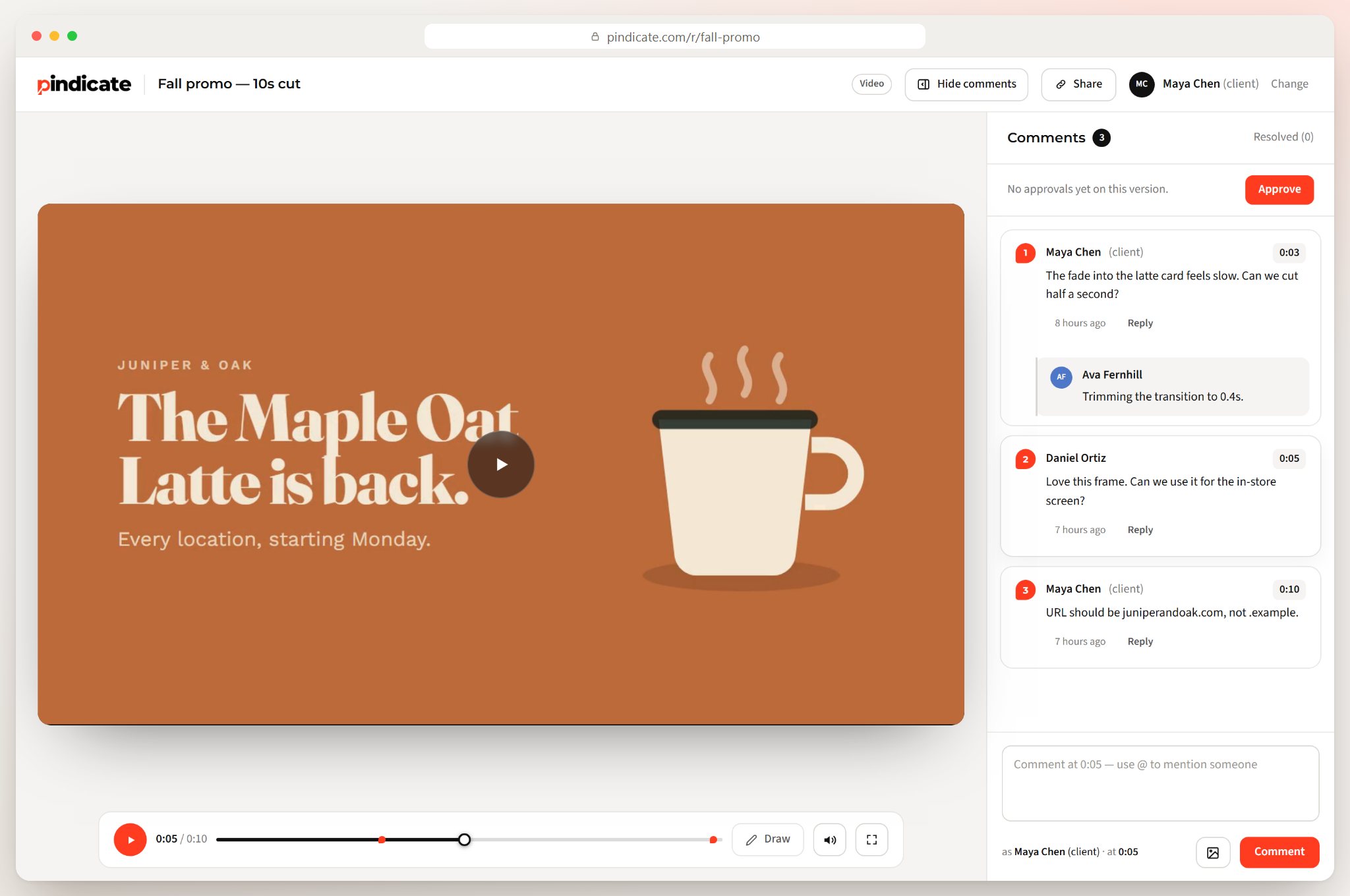
Key Insight: if even one project a month is a video or a web page, a PDF-only tool costs you a second tool and a second login for your client.
Flat price or per user: what it costs at your size
At one person, most tools cost $12 to $20 a month. At three people, per-user tools triple and flat tools don't move.
Take a 3-person studio. ReviewStudio Pro and Frame.io Pro both land at $45 a month. GoVisually Lite is $48 on annual billing. Pindicate Pro stays at $12. Approval Studio Lite stays at $60 and still has two seats spare.
At five people, the per-user tools are $75 to $80 a month, which is $900 to $960 a year. The flat tools are the same price they were at one person.
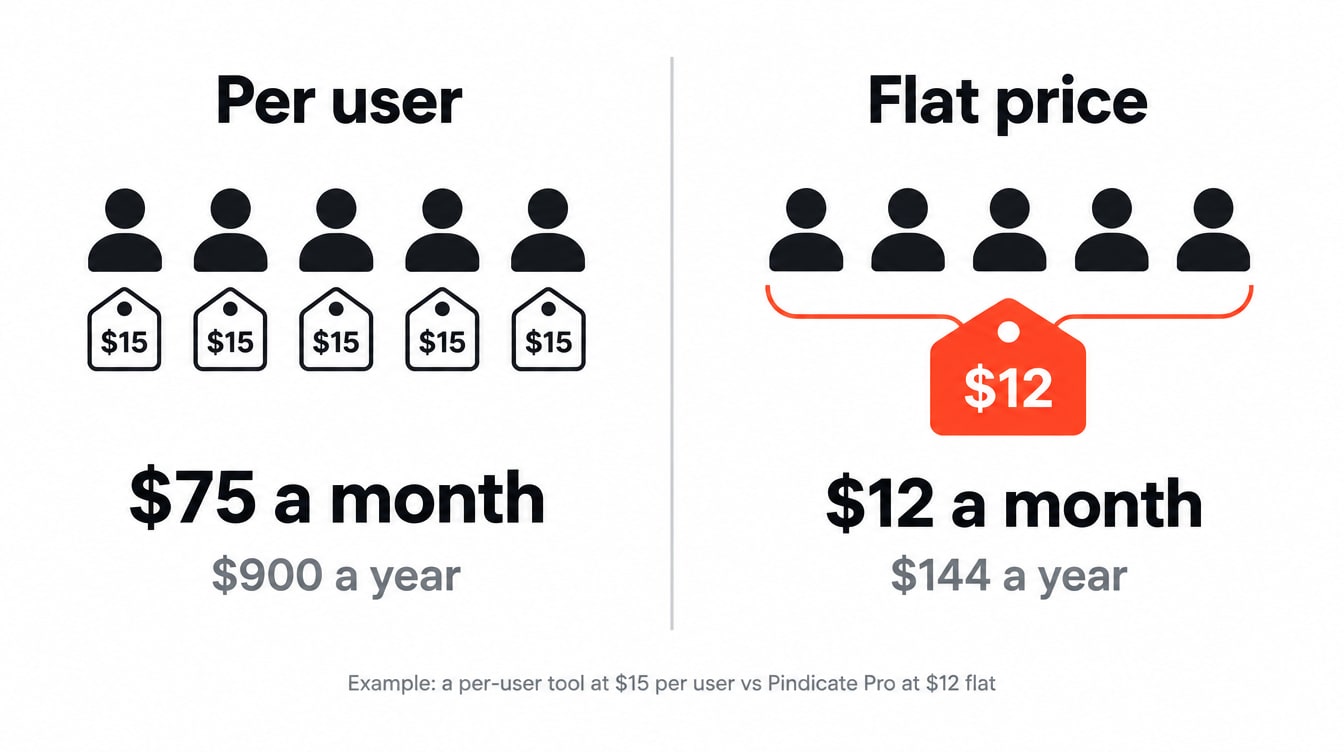
Pindicate for small teams explains how the 5 teammate logins work: each teammate gets their own login, and the bill doesn't change.
Quick Win: before you buy, count the people who upload and manage, not the clients who comment. That number sets your bill on every per-user tool.
Do clients need an account?
On every tool in this list that states it, no. Clients open a link and comment.
The differences are small. Pindicate asks for a name. ReviewStudio uses a guest link with an optional password. Approval Studio and GoVisually invite external reviewers by link or email, and neither counts them as users. Frame.io and Filestage both say reviewers don't sign up. PageProof doesn't state it on its pricing page.
How to choose
Answer these five and the list shrinks to one or two tools.
- How many people need their own login? (That's your bill on per-user tools.)
- What formats do you send besides PDFs and images?
- Do clients need to approve, not just comment?
- What does the free plan cap, and will you hit it this month?
- Do you need print or compliance tools, or would they just be in the way?
A solo designer who sends logos, a reel and the occasional landing page needs formats and a flat price. A 12-person marketing team needs stages and seats. Those are different tools, and that's fine.
Frequently Asked Questions
What is the best online proofing software?
It depends on team size and formats. For freelancers and small studios, Pindicate (flat $12 a month), ReviewStudio (free plan, then $15 per user) and Approval Studio ($60 for 5 users) cover design, video and web pages. Marketing teams with formal rounds fit Filestage. Agencies of 15 or more fit Ziflow or PageProof.
Is there free proofing software?
Yes. Pindicate (3 active reviews), ReviewStudio (3 active reviews, 5 GB), Filestage (1 active project), Ziflow (2 users, 2 GB, 60-day proofs) and Frame.io (2 members, 2 GB) all have free plans with caps. GoVisually and Approval Studio offer trials only. PageProof doesn't state a free plan.
How much does PageProof cost per month?
PageProof's Team plan is $249 a month, or $2,999 a year. Team Plus is $499 a month or $4,999 a year. Enterprise is quoted. All plans include unlimited reviewers, proofs and storage, according to its pricing page in October 2026.
What is client proofing software?
For designers, client proofing software is a tool where clients view the work, pin comments to exact spots and approve it, usually without making an account. For photographers the same phrase means gallery proofing, where clients pick the shots they want printed. This list covers the first kind.
What is the best online proofing software for printers?
Print shops need compare modes, barcode checks and a logged sign-off per job. On this list, Approval Studio and GoVisually come closest, with compare modes, barcode scanning and artwork-specific tools. Color-managed soft proofing is a separate category that none of these eight replace.
What is the best proofreading app?
Proofreading apps check grammar and spelling in text. That's a different category from proofing software, which is for reviewing and approving creative work like designs, videos and web pages. This list doesn't cover grammar tools.
Try the flat-price option
If you're one person or a small studio and you send more than PDFs, try Pindicate with your own file. Clients never sign up, and the price doesn't change when a teammate joins.