Ziflow pricing explained: Free, Standard at $199 and Pro at $329 a month billed yearly, plus Enterprise. See real yearly costs and what each plan includes.
Table of contents
TL;DR: Ziflow has four plans: Free ($0), Standard ($199 a month billed yearly), Pro ($329 a month billed yearly) and custom Enterprise. Standard includes 15 users and Pro includes 20, and reviewers are always free. That's cheap per person for a 15-person team, but a 3-person studio still pays $2,388 a year.
Key takeaways:
- Free: 2 users, 2GB, and proofs close after 60 days.
- Standard costs $2,388 a year up front. Pro costs $3,948.
- Month to month, Standard is $249 and Pro is $399.
- Reviewers never need a Ziflow license, on any plan.
- Automatic deadline reminders and e-signatures are Enterprise only.
Prices checked on ziflow.com on October 20, 2026.

Ziflow keeps coming up when you look for proofing software. Agencies recommend it. Review sites rank it. You just want one number: what will this cost me?
This guide gives you that number. Here's Ziflow pricing for every plan, what a year really costs at different team sizes, and what you only get on the top tier. Then you can decide whether it fits a team your size.
How much does Ziflow cost?
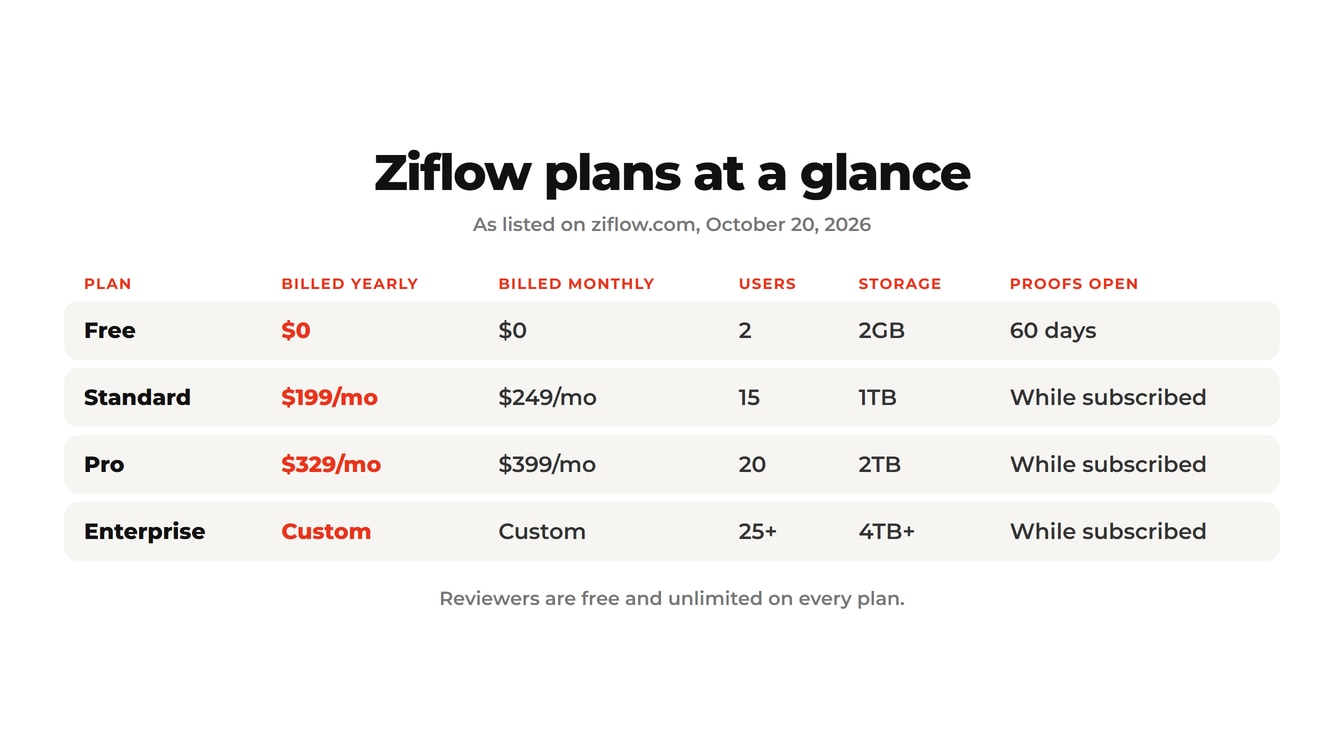
Ziflow costs $0 on Free, $199 a month on Standard and $329 a month on Pro, when you pay for a year at once. Paying month to month, Standard is $249 and Pro is $399. Enterprise is custom pricing through sales.
| Plan | Billed yearly | Billed monthly | Users included | Storage | Workflow stages | Proof access |
|---|---|---|---|---|---|---|
| Free | $0 | $0 | 2 | 2GB | 1 | 60 days |
| Standard | $199/mo | $249/mo | 15 | 1TB | 2 | While subscribed |
| Pro | $329/mo | $399/mo | 20 | 2TB | 3 | While subscribed |
| Enterprise | Custom | Custom | 25+ | 4TB+ | Unlimited | While subscribed |
Source: Ziflow pricing page, checked October 20, 2026.
A user in Ziflow is someone who creates and manages proofs. A reviewer only looks at a proof and leaves feedback. Reviewers are free and unlimited on every plan. Ziflow's FAQ says "a user license is only required to create and manage proofs."
Need more users? Ziflow adds them in packs of 5, and each pack adds storage. The price of a pack isn't listed on the pricing page, so you'd ask sales.
Watch Out: "Billed yearly" means paying for the whole year at once. That's $2,388 for Standard or $3,948 for Pro, charged up front. Month to month costs $50 to $70 more each month.
What does a year of Ziflow really cost?
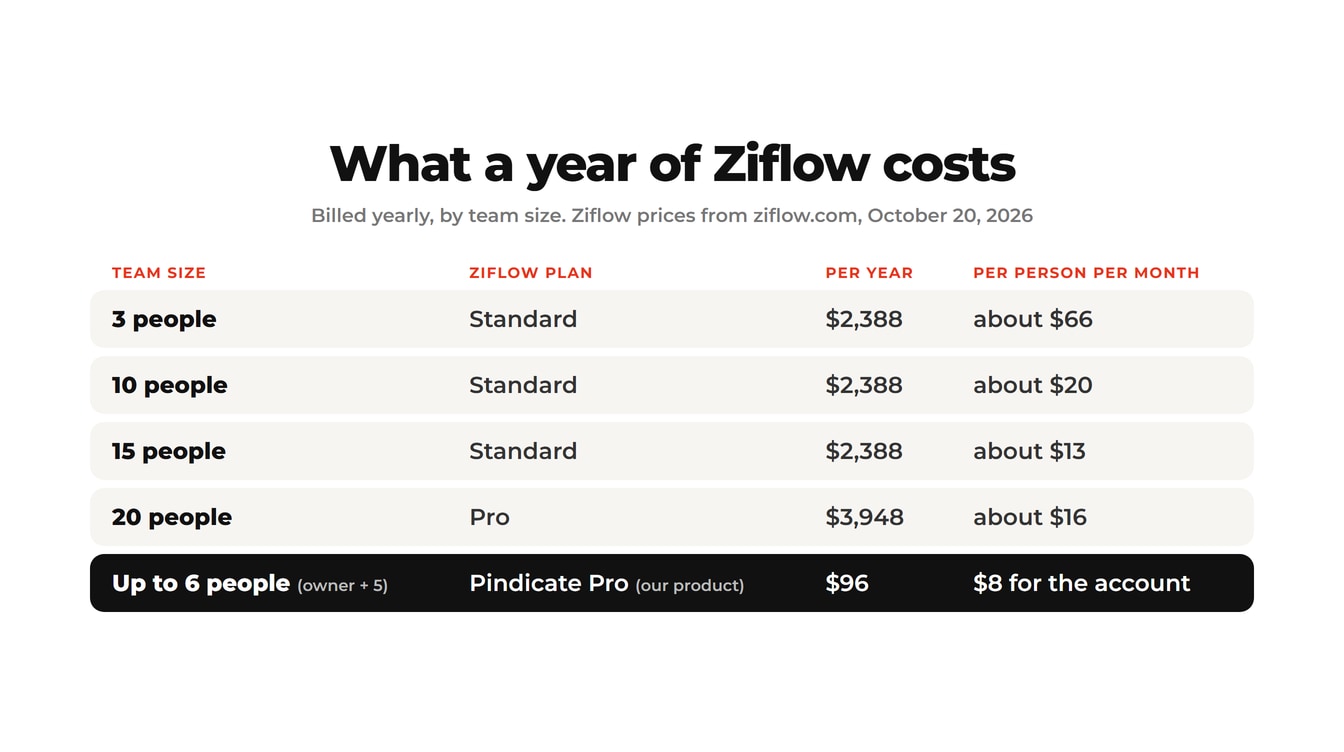
A year of Ziflow costs $2,388 on Standard or $3,948 on Pro, billed yearly. Because paid plans start with 15 or 20 users included, the price per person depends heavily on your team size.
| Team size | Plan that fits | Yearly cost (billed yearly) | Per person per month |
|---|---|---|---|
| 1 | Free, or Standard | $0 or $2,388 | $0 or $199 |
| 3 | Standard | $2,388 | about $66 |
| 10 | Standard | $2,388 | about $20 |
| 15 | Standard | $2,388 | about $13 |
| 20 | Pro | $3,948 | about $16 |
Math: $199 × 12 = $2,388. $329 × 12 = $3,948. Per person divides the monthly price by team size.
Key Insight: Ziflow's paid plans are priced for teams of 15 or 20. A 3-person studio on Standard pays the same $199 a month as a 15-person agency. That's about $66 a person instead of $13.
The flip side is real, though. At full size, Ziflow is one of the cheaper options per person.
Reality Check: For a 15-person team, Ziflow Standard works out to about $13 a person each month. That's less than Frame.io Pro, which charges $15 per member. See Frame.io pricing, per person for that math.
Is Ziflow free?
Yes. Ziflow's Free plan costs $0 and is labeled "free forever." It includes 2 users, 2GB of storage, unlimited proofs and unlimited reviewers.
The free plan has real tools, not just a demo. According to Ziflow's pricing page, it covers more than 1,200 file types, unlimited versions, pixel-level version comparison and Adobe Creative Cloud plugins.
The catch is time. On the Free plan, "proofs can be accessed for up to 60 days from when they were created." After that, the proof closes. Paid plans keep proofs open as long as you subscribe.
Pro Tip: Test Ziflow on the Free plan with a real client job, but finish it within 60 days. Don't use it for work a client may reopen next quarter, like a brand guide or a packaging file.
What do you get on each Ziflow plan?
Standard adds the basics a team needs, Pro adds collaboration and integrations, and Enterprise adds automation and security. Each plan includes everything in the one before it.
Ziflow Standard ($199/mo billed yearly)
- 15 users, 1TB of storage, 2 workflow stages
- Several static files in one proof, and proofs in bulk
- Folders to organize proofs
- Proof deadlines and manual reminders
- Proof briefs and basic intake forms
- An audit trail covering 90 days
Ziflow Pro ($329/mo billed yearly)
- 20 users, 2TB of storage, 3 workflow stages
- Video and rich media together in one proof
- Folder share links and access permissions
- Marking comments as resolved, and custom comment labels
- Dropbox, Google Drive, SharePoint, Slack and Teams integrations
- An audit trail covering 1 year, plus 24/7 support
Ziflow Enterprise (custom pricing)
- 25+ users, 4TB+ of storage, unlimited workflow stages
- Automatic deadline reminders
- Electronic signatures
- A white-label proof viewer and your own domain
- Single sign-on, guest reviewer two-factor login and IP allowlisting
- ReviewAI, Ziflow's AI review assistant
That last list matters for small teams. Some features you might expect on any plan only appear on Enterprise. Automatic reminders are one. Signed approvals are another. Both are steps in a solid artwork approval process.
Running a team of 1 to 5? Try Pindicate free: one link, your clients comment and approve without an account, and Pro is a flat $12 a month.
Hidden costs and fine print
Ziflow has no surprise fees, but four things change what you'll pay. None are hidden, but they're easy to miss on a first read.
- Up-front billing. The $199 and $329 prices are for a year paid at once. Monthly billing exists, at $249 and $399.
- Seats you may not need. Paid plans start at 15 users. A small team pays for empty seats.
- Extra users come in packs of 5. The pack price isn't on the pricing page.
- Key features sit on Enterprise. Automatic reminders, e-signatures and white label all need a sales call.
On the plus side, the contract terms are friendly. Ziflow's FAQ says subscriptions are "paid monthly or yearly" and that you can "start - and stop - your service at any time." To cancel, an account admin contacts Ziflow support.
Is Ziflow worth it?
Ziflow is worth it for agencies and in-house teams of about 15 or more that need workflow stages, audit trails and compliance tools. For freelancers and small studios, it's usually more tool and more cost than the job needs.
| Ziflow is a good fit if... | A lighter tool fits if... |
|---|---|
| 15 or more people create and manage proofs | 1 to 5 people send work to clients |
| You need multi-stage approvals (legal, brand, client) | One client contact gives the final yes |
| You need audit trails, single sign-on or e-signatures | A name and date on the approval is enough |
| You review HTML5 banners and campaign sets | You review designs, PDFs, videos and sites |
| You can commit to $2,388 or more a year | You want a low flat price, month to month |
Picture two teams. A 20-person in-house brand team runs every ad past legal, brand and the regional lead. Ziflow Pro's three workflow stages and audit trail earn their $3,948 a year.
Now picture a 3-person design studio with a dozen clients. Each client has one contact who says yes or asks for changes. That studio would pay $2,388 a year for 15 seats and workflow stages it won't use. If that sounds like you, Pindicate for agencies covers the same client loop for small teams.
A simpler option for smaller teams
If you have 1 to 5 people and mostly need clients to comment and approve, a lighter tool costs far less. Pindicate (our product) is built for that size of team.
You upload a file and share one link. Your client clicks the spot and types a note, or leaves a note at the exact second on a video. They never make an account. It handles images, PDFs, video, websites, audio, Word files, Google Docs and Slides, and email. That's the same idea Ziflow calls free reviewers, at a much smaller price. See it in our client feedback tool for small teams.
The price is flat:
- Free: 3 active reviews and 5GB, no per-file size limit
- Pro: $12 a month or $96 a year, for the whole account
Pro adds versions on the same link and client approvals with their name and the date. It also adds up to 2 automatic reminders when a client goes quiet, your logo, and up to 5 teammate logins. Graphic designers can see the full workflow in proofing for graphic designers.
Now the honest limits. Pindicate has no multi-stage workflows, no audit trail and no e-signatures. Pro storage is 100GB, not terabytes. A team that needs those should look at Ziflow, or compare more tools in the best online proofing software, compared.
Frequently Asked Questions
Is Ziflow free?
Yes. Ziflow's Free plan costs $0 and includes 2 users, 2GB of storage, unlimited proofs and unlimited reviewers. The main limit is time: proofs on the Free plan can only be opened for 60 days after they're created. Paid plans keep proofs open for as long as you subscribe.
How much is Ziflow per month?
Ziflow Standard costs $199 a month and Pro costs $329 a month when you pay for a full year at once. Paying month to month, Standard is $249 and Pro is $399. Enterprise has custom pricing. Prices were checked on Ziflow's pricing page in October 2026.
Do reviewers need a Ziflow license?
No. Ziflow allows unlimited reviewers on every plan, including Free. A user license is only needed for people who create and manage proofs. Clients, managers and anyone else who only reviews and approves work can do it for free.
Does Ziflow offer a yearly discount?
Yes. According to Ziflow's FAQ, paying yearly saves 20% on Standard and 17.5% on Pro. That's the difference between $249 and $199 a month on Standard, and $399 and $329 on Pro. Ziflow also mentions educational discounts on some plans.
Can I cancel Ziflow anytime?
Ziflow says subscriptions are paid monthly or yearly, and that you can start and stop service at any time. To cancel, an account administrator needs to contact Ziflow support. If you paid for a year up front, check your contract terms before you cancel.
What is the best online proofing software?
It depends on your team size. Agencies of 15 or more with formal approval rounds often fit Ziflow or PageProof. Freelancers and small studios usually do better with a flat-price tool where clients comment without an account, such as Pindicate at $12 a month.
Pick the plan that fits your team size
Ziflow is priced for teams of 15 and up. At that size, it's fair value, with strong workflow and compliance tools. Below that size, you're paying for seats and features you won't touch.
If your team is small and your clients just need to comment and approve, start lighter. Try Pindicate free: upload a file, share one link, and your clients comment and approve without signing up. Start your first review link. When you need versions and approvals, Pindicate pricing is a flat $12 a month.