Frame.io pricing explained: Free, Pro at $15 and Team at $25 per member. See what 1, 3 and 5 people really pay a year. Checked October 2026.
Table of contents
- How much does Frame.io cost?
- What does Frame.io really cost for your team size?
- Is Frame.io free with Adobe Creative Cloud?
- Does Frame.io have a free plan?
- Do clients have to pay to review on Frame.io?
- Is Frame.io worth the price?
- If you only need client feedback: a flat-price option
- Which option fits you?
- Frequently Asked Questions
- Try the flat-price option
Prices checked on frame.io on October 7, 2026. We re-check them when Frame.io changes its plans.
TL;DR: Frame.io pricing has four plans: Free ($0, 2 members, 2GB), Pro ($15 per member per month), Team ($25 per member per month) and custom Enterprise. Every price is per member, plus tax, so a 3-person studio on Pro pays $45 a month. Annual billing saves 13%. Some Creative Cloud plans include a small Frame.io tier.
Key takeaways
- You pay for every member who logs in. Clients who only review are free on every plan.
- Member caps force upgrades: Free stops at 2 people, Pro at 5, Team at 15.
- Creative Cloud All Apps, Premiere and After Effects plans include Frame.io for 2 users, 5 projects and 100GB.
- The Pro and Team free trials ask for a card and roll into a paid plan unless you cancel.
The number on Frame.io's pricing page is $15. That's the price of one person.
Frame.io pricing is per member, so your real bill depends on how many people need a login. Most guides stop at the sticker price. This one does the math for 1, 2, 3, 5 and 10 people, monthly and yearly.
A quick note on where I'm coming from. I make Pindicate, a client feedback tool. I started it because Frame.io was costing me too much, and it only covered my video work. So I have a bias, and I'll label Pindicate every time it shows up. Every Frame.io number below comes from Frame.io's pricing page. For the wider field, see our list of 6 Frame.io alternatives for freelancers.
How much does Frame.io cost?
Frame.io costs $0 on Free, $15 per member per month on Pro and $25 per member per month on Team, before tax. Enterprise is custom pricing through a sales call. Paying yearly takes 13% off Pro and Team.
Frame.io is Adobe's video review and collaboration platform. Adobe completed its acquisition of Frame.io on October 7, 2021, and it's now tied closely to Premiere. Here's what each plan includes today.
| Plan | Price | Members | Storage | Projects | What stands out |
|---|---|---|---|---|---|
| Free | $0, no card | Up to 2 | 2GB | 2 | Camera to Cloud, transcription and captions |
| Pro | $15 per member per month + tax | Up to 5 | 2TB + 2TB per added member | Unlimited | Branded and passphrase-protected shares, link expiry, 4K playback |
| Team | $25 per member per month + tax | Up to 15 | 3TB + 2TB per added member | Unlimited | Restricted projects and folders, internal comments |
| Enterprise | Custom | Custom | Custom | Unlimited | Single sign-on, multiple workspaces, advanced watermarking |
Enterprise comes in two types. Select is the standard plan. Prime adds Storage Connect, secure sharing, session-based and forensic watermarking, and digital rights management.
Watch Out: "per member" means every person who logs in. Add a fourth editor to a Pro account and the bill goes up $15 a month, before tax.
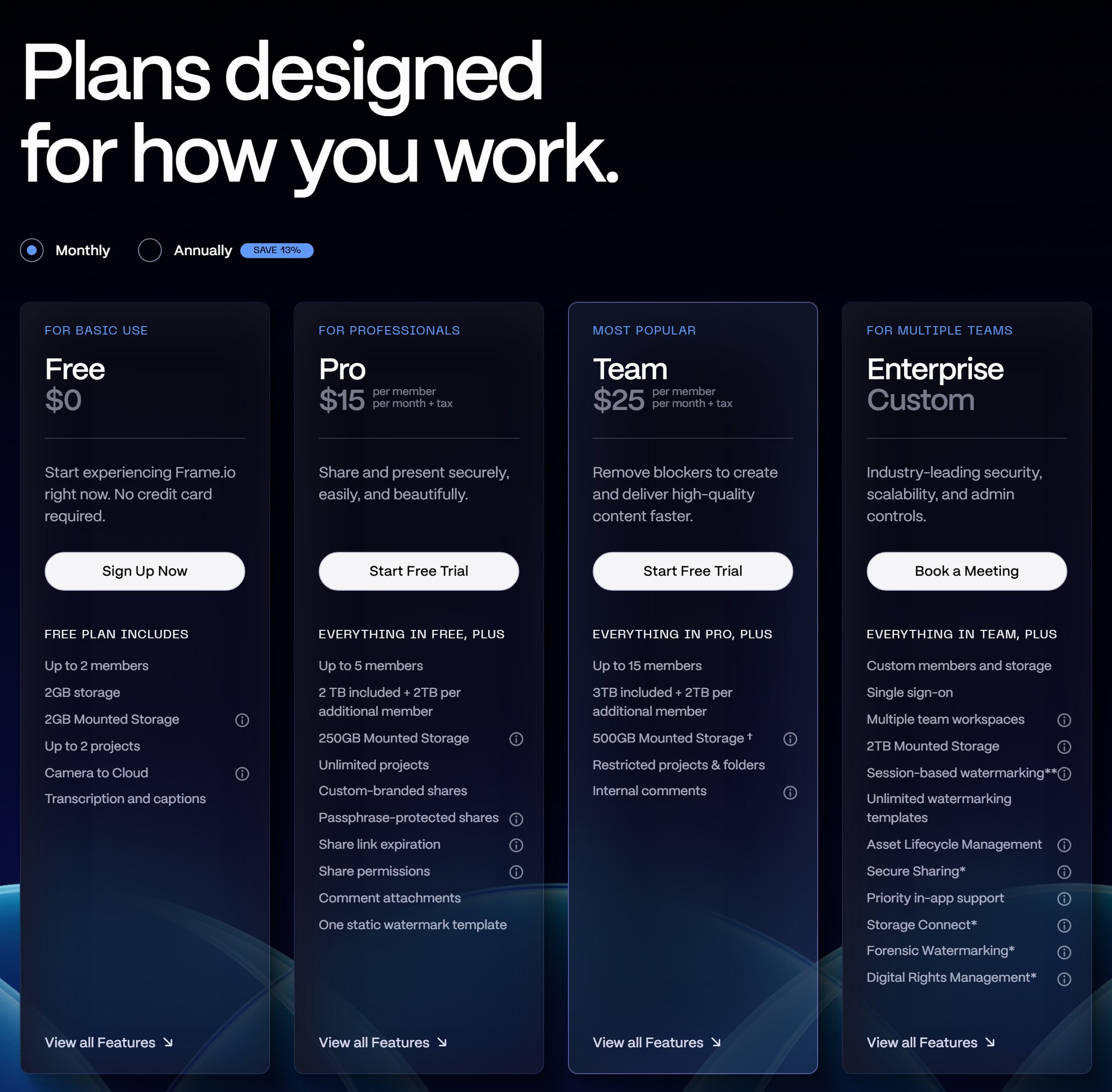
Frame.io's pricing page on October 7, 2026, with monthly billing selected.
What does Frame.io really cost for your team size?
A solo user pays $180 a year on Frame.io Pro, or about $157 with annual billing. A 5-person team on the Team plan pays $1,500 a year, or about $1,305 billed annually. Both are before tax.
Frame.io says it plainly in its FAQ: "The pricing table above shows the cost of a single user for each plan." Here's what that turns into.
| People with a login | Frame.io Free | Frame.io Pro | Frame.io Team | Pindicate Pro (ours) |
|---|---|---|---|---|
| 1 | $0 | $15/mo ($180/yr) | $25/mo ($300/yr) | $12/mo or $96/yr |
| 2 | $0 (max 2) | $30/mo ($360/yr) | $50/mo ($600/yr) | One login only* |
| 3 | Not available | $45/mo ($540/yr) | $75/mo ($900/yr) | One login only* |
| 5 | Not available | $75/mo ($900/yr) | $125/mo ($1,500/yr) | One login only* |
| 10 | Not available | Not available (max 5) | $250/mo ($3,000/yr) | One login only* |
*Pindicate is one login. Teammates can be @mentioned and reply on a review, but they can't sign in. If several people need their own dashboards, Frame.io's per-member plans are the honest comparison, not Pindicate.
Annual billing takes 13% off. That's about $157 a year for one person on Pro, about $783 for five on Pro and about $1,305 for five on Team. Frame.io doesn't print the yearly dollar amount, so confirm the total at checkout.
Two caps change your bill more than the per-member price. Pro holds 5 members, so a sixth person moves the account to Team at $25 each. Team holds 15, so the sixteenth person means an Enterprise sales call.
Here's how that plays out. Say you run a 3-person studio: you, an editor and a motion designer. On Pro that's $45 a month. Add two more people and it's $75. Hire a sixth and you're on Team: 6 × $25 = $150 a month, or $1,800 a year.
Storage grows with your headcount. Pro includes 2TB plus 2TB per added member, so 3 people on Pro get 6TB.
Heads Up: prices are before sales tax, which Frame.io adds based on your billing address. The Pro and Team free trials also ask for billing info, and they roll into a paid plan unless you cancel first.
That per-member math is why the subject keeps coming up in editor communities. One r/editors thread is titled, simply, "Looking for Frame.io alternatives – pricing is getting out of hand."
Is Frame.io free with Adobe Creative Cloud?
Partly. Creative Cloud All Apps, Premiere and After Effects subscribers get Frame.io for Creative Cloud at no extra cost. It includes 2 users, 5 projects, 100GB of storage, unlimited reviewers and Camera to Cloud.
According to Frame.io for Creative Cloud, students and teachers on an Individual All Apps plan get it too. Creative Cloud users also get a 30-day trial of the Team plan. When the trial ends, you either pay for Team or drop back to the included tier.
The included tier covers a solo Premiere editor with one collaborator well. It runs out when a third person needs access or a sixth project starts. At that point you're paying for Pro or Team, billed separately from Creative Cloud.
Pro Tip: check your Creative Cloud plan before you pay for Frame.io Pro. If you edit alone in Premiere and keep 5 or fewer projects going, the included tier may be all you need.
Does Frame.io have a free plan?
Yes. Frame.io Free costs $0, needs no credit card and allows 2 members, 2GB of storage and 2 projects. It also includes Camera to Cloud and transcription and captions.
2GB fills up fast with video, so Free works best as a test drive. You can share a real cut with a real client, collect comments and see if the workflow fits before you pay.
If you go over a limit, Frame.io warns you in the app. You then get "a brief window of time" to get back under the limit or upgrade.
Do clients have to pay to review on Frame.io?
No. Clients review Frame.io work for free through share links, and they don't need an account. Frame.io's FAQ says you can share "with anyone outside your Frame.io account for free via Share links, which don't require them to sign up or log in."
Reviewers comment in their browser or in the free iPhone and iPad apps. This is true of most review tools, Pindicate included. So "clients don't need a login" shouldn't decide between tools. Price model, file types and storage should.
Key Insight: you pay for the people who upload and manage the files, not the people who leave comments.
Is Frame.io worth the price?
Frame.io is worth it if you edit video in Premiere with several people who each need a login and lots of storage. It's harder to justify if you're one person who mainly needs clients to comment on files.
Users like the product. On Capterra's Frame.io pricing page, it's rated 4.6 out of 5 across 80 reviews, with a lower 4.1 for value for money. That gap matches what you hear from freelancers. A colorist on r/colorists put it this way: "Frame is great for review and larger teams, but it's very expensive as a file transfer service for freelancers."
Frame.io is worth it when:
- You cut in Premiere and want client comments as markers on your timeline.
- You shoot with Camera to Cloud and want takes uploaded from set.
- You need terabytes of storage. Pro starts at 2TB.
- Several editors need their own logins, version stacks and 4K playback.
Frame.io is overkill when:
- You work alone and send a few cuts to clients each month.
- Most of your client files aren't video: logos, PDFs, websites, decks.
- You need feedback and sign-off, not a media library.
Reality Check: storage is where Frame.io clearly wins. Pindicate Pro includes 50GB. Frame.io Pro starts at 2TB.
If you only need client feedback: a flat-price option
Pindicate (our product) costs $12 a month, or $96 a year, for one account. There's no per-member pricing, and a Free plan covers 3 active reviews at a time.
Pindicate is built for client feedback across formats: video, audio, images, PDFs, websites, HTML files, Word docs, Google Docs and Slides, and emails. Clients open a link and comment without an account, same as Frame.io. On images, PDFs and websites, they click the exact spot and a numbered pin marks the note. On video, each note is tied to the second, and clients can draw on the frame.
Pro adds versions on the same link, client approvals, automatic reminders, 50GB of storage and videos up to 2GB.
Now the honest limits. Pindicate is one login. You can add teammates to a Team list and @mention them on a comment. They get an email and can reply on the review, but they can't sign in to the dashboard. There's no Premiere integration and no Camera to Cloud. If three editors each need their own workspace, Frame.io's per-member plans are the fair comparison.
See Pindicate's pricing, or try it without signing up: drop a file in the upload box and you'll have a review link in about 10 seconds.
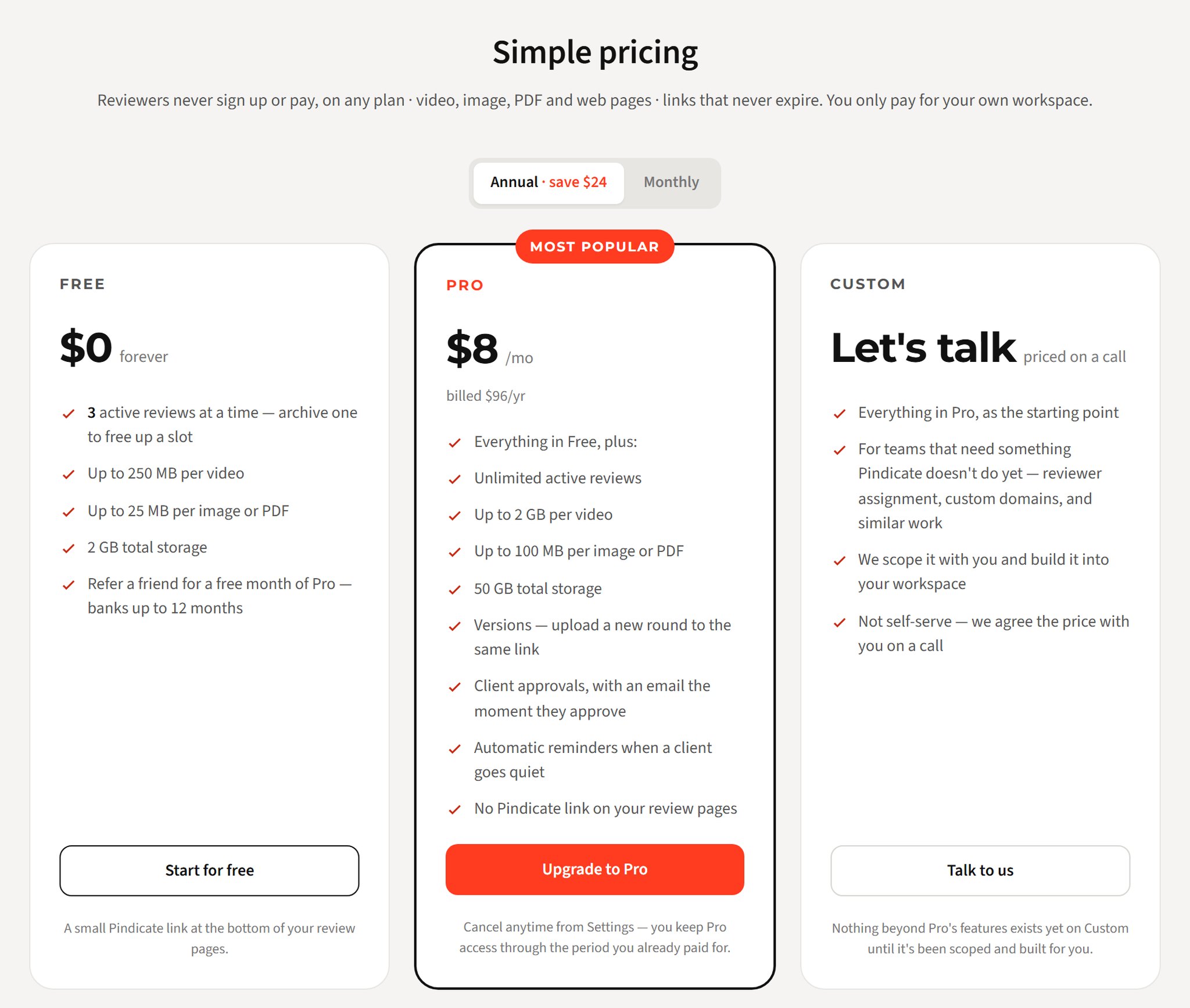
Pindicate's pricing page on October 7, 2026, with annual billing selected ($96 a year).
Which option fits you?
The right pick depends on who needs a login and what you send clients. Use this table as a shortcut.
| You are | Best fit | Why |
|---|---|---|
| Solo Premiere editor with Creative Cloud | Frame.io for Creative Cloud (included) | You've already paid for it |
| Video team of 3 to 5 editors | Frame.io Pro or Team | A login per editor, terabytes of storage, Premiere |
| Freelancer sending designs, PDFs, sites and cuts to clients | Pindicate (for freelancers) | One flat price, many file types |
| Small studio where one person runs client reviews | Pindicate Pro (for small creative teams) | One login, @mention teammates by email |
| Large company that needs single sign-on and DRM | Frame.io Enterprise | Security and admin features |
If none of these fit, our Frame.io alternatives comparison covers five more tools with prices.
Frequently Asked Questions
how much does frame.io cost per month?
Frame.io costs $15 per member per month on Pro and $25 per member per month on Team, before tax. The Free plan is $0 for up to 2 members, and Enterprise is custom pricing. Annual billing takes 13% off Pro and Team. A 3-person team on Pro pays $45 a month.
is frame.io free with adobe?
Frame.io for Creative Cloud is included with Creative Cloud All Apps, Premiere and After Effects subscriptions at no extra cost. It covers 2 users, 5 projects, 100GB of storage and unlimited reviewers. If you need more people, projects or storage, you pay for a Frame.io Pro or Team plan separately.
is frame.io expensive?
It depends on headcount. One person on Pro pays $180 a year, and five people on Team pay $1,500 a year, before tax. That's reasonable for a video team that uses the storage and Premiere tools. It's a lot for one person who only needs clients to comment.
does frame.io have a free trial?
Yes. Frame.io Pro and Team both offer a free trial. You enter your contact and billing information to start it, and you aren't charged during the trial. When it ends, you're enrolled in the plan you picked unless you cancel before the trial is over.
how much is frame.io enterprise?
Frame.io Enterprise has no public price. You book a meeting with Frame.io's sales team for a custom quote. There are two types: Select, the standard plan, and Prime, which adds Storage Connect, secure sharing, forensic watermarking and digital rights management.
do my clients need a frame.io account to leave comments?
No. Frame.io share links let clients view and comment for free, with no sign-up or login. They can comment in a browser or in Frame.io's free iPhone and iPad apps. You only pay for members on your own account, not for the people reviewing your work.
Try the flat-price option
Frame.io is priced per member, and it's at its best for video teams working in Premiere with plenty of storage. If you need clients to comment on many kinds of files at one flat price, Pindicate is $12 a month or $96 a year, with a Free plan to start.
See Pindicate's pricing or start free. Your clients never sign up or pay.