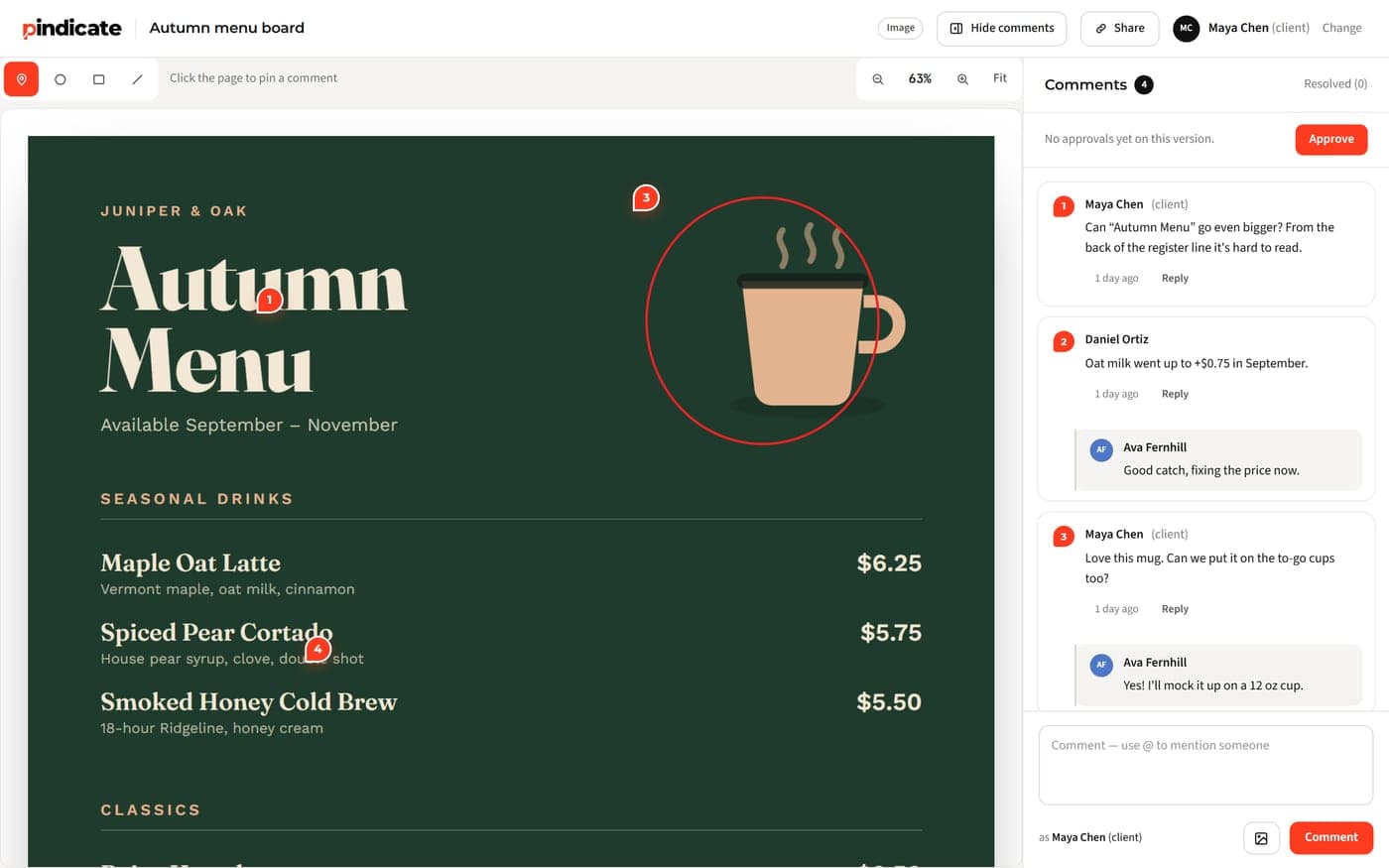
Compare 6 Frame.io alternatives by price, pricing model and what clients need to comment. Prices checked October 2026, plus when to stay put.
Table of contents
TL;DR: The best Frame.io alternative depends on how you're billed and who reviews your work. Freelancers and small studios save the most with a flat price, like Pindicate or Wipster Light. Teams already paying for Dropbox can add Replay. Big marketing teams fit Filestage or PageProof. Stay on Frame.io if you live in Premiere Pro.
Pick by your situation
- Solo, or 2 to 5 people, and you want one flat price: Pindicate or Wipster Light
- Your files already live in Dropbox: Dropbox Replay
- You run an animation or storyboard pipeline: Krock.io
- You're a marketing team with formal approvals: Filestage or PageProof
- You edit in Premiere Pro all day or shoot with Camera to Cloud: stay on Frame.io
Frame.io is good software. Most people who search for Frame.io alternatives aren't unhappy with the product. They're unhappy with the bill, because Frame.io charges per member and a growing studio pays more every time someone joins.
That's how this started for me. Frame.io cost me a lot, and it only covered my video work. My clients also reviewed logos, PDFs and websites, and that feedback landed in email, Slack and WhatsApp with no single place to get a final approval. So I built one tool for all of it.
That tool is Pindicate, and it's #1 on this list because we make it. The other five are in no particular order. Every price below links to the vendor's own pricing page, and I checked each one on October 6, 2026.
What is Frame.io, and why do people look for alternatives?
Frame.io is Adobe's video review and collaboration platform. People look for Frame.io alternatives mostly because of per-member pricing, and sometimes because they review a lot more than video.
Adobe completed its acquisition of Frame.io on October 7, 2021. The Frame.io team joined Creative Cloud, and Adobe said it planned to integrate Frame.io deeply into Premiere Pro, its video editor. For Premiere Pro editors, that tie-in is one of Frame.io's real strengths.
Here's what Frame.io's pricing page lists right now:
- Free: $0 for up to 2 members, with 2 GB of storage
- Pro: $15 per member per month, up to 5 members, with 2 TB plus 2 TB per extra member
- Team: $25 per member per month, up to 15 members, with 3 TB plus 2 TB per extra member
- Enterprise: custom pricing
Run the numbers for a 3-person studio on Pro. That's $45 a month before anyone uploads a file. Add two people and it's $75.
Reality Check: Frame.io already lets clients review without an account. Its share links "don't require them to sign up or log in." If that's your only reason to switch, you may not need to. The real differences between these tools are the pricing model, the file types they handle, and how much tool you actually need.
How do these Frame.io alternatives compare?
The two tables below show each tool's pricing model, free plan, client access and best fit, then what each one costs for a team of 1, 3 or 5 people. Every fact comes from the vendor's pricing page as of October 6, 2026.
| Tool | Starting price | Pricing model | Free plan | Client account needed | Best for |
|---|---|---|---|---|---|
| Pindicate | $12/mo or $96/yr | Flat, one account | Yes, 3 active reviews | No | Freelancers sending many file types |
| Wipster | $11.95/mo (Light) | Light is flat, Team is per user | Not listed | No | Simple, low-cost video review |
| Krock.io | $10 per user (Pro) | Per user | Yes, 1 user, 2 projects | Not stated | Animation and storyboards |
| Dropbox Replay | $10 per user/mo (annual) | Per user, Dropbox add-on | Not listed | No | Teams already on Dropbox |
| Filestage | $199/mo (Starter) | Flat per team, 10 seats | Yes, 1 active project | No | Marketing teams with approvals |
| PageProof | $249/mo (Team) | Flat per team | Not listed | Not stated | Agencies wanting unlimited everything |
| Frame.io | $15 per member/mo (Pro) | Per member | Yes, 2 members | No | Premiere Pro editors, post teams |
What each tool costs per month by team size
| Tool | 1 person | 3 people | 5 people | Notes |
|---|---|---|---|---|
| Frame.io Pro | $15 | $45 | $75 | Pro caps at 5 members |
| Pindicate Pro | $12 | $12 | $12 | One account; teammates are @mentioned, not billed |
| Wipster Light / Team | $11.95 (Light) | $75 (Team) | $125 (Team) | Light is for individuals |
| Krock.io Pro | $10 | $30 | $50 | |
| Dropbox Replay | $12 + Dropbox Plus | $36 + Dropbox | $60 + Dropbox | Add-on only |
| Filestage Starter | $199 | $199 | $199 | Includes 10 seats |
| PageProof Team | $249 | $249 | $249 | Unlimited reviewers |
List prices on monthly billing, checked October 6, 2026. Annual billing is cheaper for most tools. Dropbox Replay also needs a paid Dropbox plan, which isn't included here.
Pro Tip: If you'll stay with a tool for a year, compare annual prices. Wipster Light drops from $11.95 to $9.95 a month, and Pindicate Pro drops from $12 to $8 a month on the $96 yearly plan.
The 6 alternatives
Each tool below gets the same treatment: who it's best for, what it costs, one or two real strengths, and one or two real limits.
1. Pindicate (our product): best for freelancers who want one flat price
Best for: freelancers and small studios who send clients video, designs, PDFs and websites, and want one bill that doesn't grow with the team.
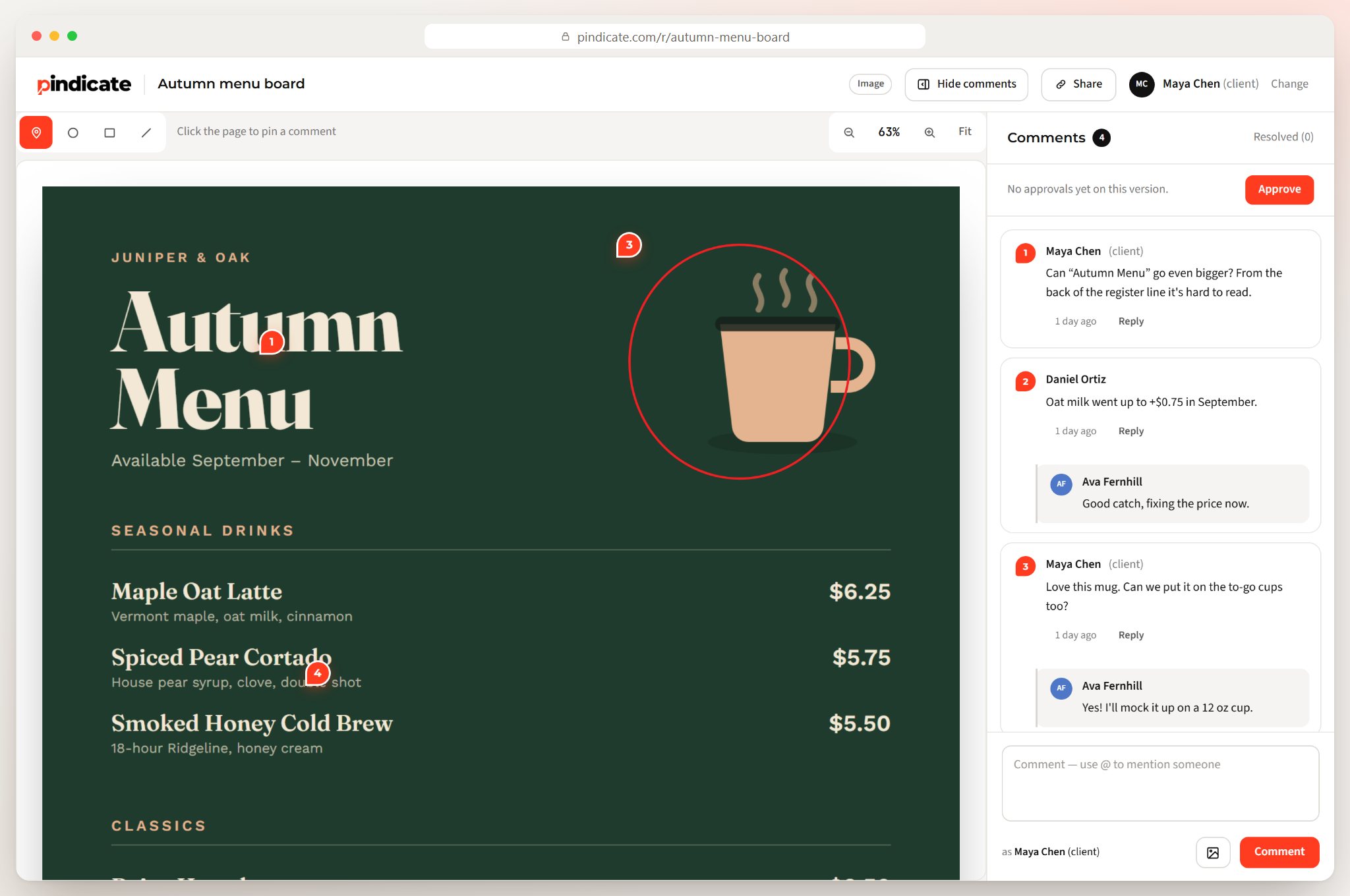
Pindicate is a client feedback tool for creative work. You upload a file or paste a link, send the client one link, and they pin comments on the exact spot, page or second.
Pricing: Free covers 3 active reviews at a time. Pro is $12 a month or $96 a year, with unlimited reviews. See Pindicate's pricing for the full list.
What it does well:
- Every format in one place. Video, audio, images, PDFs, websites, HTML files, Word docs, Google Docs and Slides, and emails all get the same pin-and-comment review. Video comments land on the exact second.
- One flat price. Pro is one account at $12 a month. Teammates go on your Team list so you can @mention them, and they aren't billed as seats.
- Approval built in. On Pro, clients click Approve and you get an email with their name and the time. Pro also adds versions on the same link and reminders when a client goes quiet.
Where it falls short:
- Video size caps. Pro allows up to 2 GB per video, so large raw files or long masters may not fit.
- No editing-app panel. There's no Premiere Pro integration and no Camera to Cloud.
- Newer and smaller. Pindicate is a young product next to a tool Adobe owns.
You can open a sample review and leave a comment as the client, or read how Pindicate works.
Try it with your own file: Upload on the homepage and you'll have a review link in about 10 seconds, with no signup. Try Pindicate free.
2. Wipster: best for simple, low-cost video review
Best for: solo video editors who mostly need clients to comment on cuts.
Wipster is a video review tool built around getting client comments on a video. Its plans include unlimited projects, reviews and reviewers.
Pricing: Wipster's pricing page lists Light at $11.95 a month, or $9.95 a month billed yearly, with 50 GB of storage. Team is $25 per user per month, or $19.95 billed yearly, starting at 250 GB. Enterprise is custom.
What it does well:
- No client signup. Wipster says clients "don't need to sign up or log in" to leave comments.
- A cheap solo plan. Light is one of the lowest prices on this list for one person.
Where it falls short:
- Per-user Team pricing. Once you need the Team plan, the bill grows with every person, just like Frame.io.
- Video-focused. If you also send designs and PDFs for review, you'll want to check that it covers your formats.
3. Krock.io: best for animation and storyboard workflows
Best for: animation studios and teams that work with storyboards as well as video.
Krock.io is a review tool aimed at animation and production pipelines. Its pricing page promises "unlimited reviewers on every plan, no extra costs."
Pricing: Krock.io's pricing page lists a Free plan for 1 user with 2 GB and 2 projects. Pro is $10 per user, with unlimited team size, unlimited projects and storage starting at 2 TB. An Unlimited plan starts at $400 for 100 users.
What it does well:
- Low per-user price. At $10 per user, Pro is the cheapest per-person plan here.
- Unlimited reviewers. You don't pay extra for clients or collaborators who only review.
Where it falls short:
- Still per user. A 5-person team pays $50 a month on Pro.
- Client access not stated. The pricing page doesn't say whether reviewers need an account to comment, so check before you send a client a link.
4. Dropbox Replay: best if your files already live in Dropbox
Best for: teams that already pay for Dropbox and want review without a separate tool.
Dropbox Replay is a review add-on for Dropbox. It handles video, image, audio, PSD and PDF projects.
Pricing: Dropbox Replay's page lists $10 per user per month billed annually, or $12 billed monthly. It's an add-on: Dropbox Basic users have to upgrade to Plus or higher first, and it isn't available on Family plans.
What it does well:
- No new place for files. Your files stay in Dropbox, where they already are.
- No reviewer account. Reviewers don't need a Dropbox account to comment.
Where it falls short:
- Two bills. You pay for Dropbox and for Replay, per user.
- Tied to Dropbox. If you don't use Dropbox already, this is the long way around.
5. Filestage: best for marketing teams with formal approvals
Best for: in-house marketing teams that review lots of content and need structured approvals.
Filestage is a review and approval platform for marketing and creative teams. It covers many content types, and reviewers comment without making an account.
Pricing: Filestage's pricing page lists a Free plan with 10 seats, 2 GB and 1 active project. Starter is $199 a month with 10 seats and 1 TB. Business is $329 a month with 3 TB. Enterprise is tailored, and extra seats come in bundles of 5.
What it does well:
- No reviewer account. Filestage says reviewers "don't need to make an account to give feedback."
- Seats included. Ten seats come with every plan, so a mid-size team isn't billed person by person.
Where it falls short:
- Built for teams. At $199 a month, Starter is a lot for one freelancer.
- Free plan is tight. One active project at a time won't cover a working freelancer's week.
6. PageProof: best for agencies that want unlimited everything
Best for: agencies with steady volume that want unlimited reviewers, proofs and storage at one team price.
PageProof is an online proofing platform with flat team pricing. Every plan includes unlimited reviewers, unlimited storage and unlimited proofs.
Pricing: PageProof's pricing page lists Team at $249 a month or $2,999 a year, and Team Plus at $499 a month or $4,999 a year. Enterprise is by quote.
What it does well:
- Nothing to count. Unlimited reviewers, proofs and storage means no surprise limits.
- Flat team price. Adding people doesn't change the bill.
Where it falls short:
- Price. At $249 a month, it's out of range for most freelancers.
- Client access not stated. The pricing page doesn't say whether reviewers need an account.
When should you stay on Frame.io?
Stay on Frame.io if you edit in Premiere Pro every day, use Camera to Cloud, or run a larger post team that depends on its integrations. Those are real advantages for video-heavy teams.
- Premiere Pro. Adobe owns both, and it set out to integrate Frame.io deeply into Premiere Pro after the 2021 acquisition. If you live in Premiere Pro, check how much of your review happens inside it today.
- Camera to Cloud. Frame.io's Camera to Cloud sends footage from the camera to collaborators without a manual upload. If your shoots depend on it, test any alternative's equivalent before you leave.
- Larger teams. The Team plan covers up to 15 members, with more storage per person.
- Very large files. If you review long, high-resolution masters, check each alternative's size limits before you switch.
Key Insight: Switching tools costs time. You'll re-upload work, re-send links and teach clients a new screen. If Frame.io's per-member price isn't hurting yet, staying put may be the smartest move.
How to choose a Frame.io alternative
Choose by how many people need their own login, what you send besides video, and whether clients need to approve as well as comment. Five questions sort most freelancers into the right tool:
- How many people need their own login? One or two points to a flat price. Ten or more points to a team plan.
- What do you send besides video? If it's designs, PDFs and websites too, pick a tool that reviews all of them.
- Do clients need to approve, or only comment? A written approval with a name and date protects you when scope changes.
- How big are your largest files? Check the per-file limit against your biggest export.
- Do you need it inside your editing app? If yes, Frame.io is hard to beat.
Watch Out: Free plans have caps. Pindicate limits active reviews, Krock.io limits projects, Filestage limits active projects, and Frame.io limits members. Match the cap to how many client projects you run at once.
Frequently Asked Questions
Is Frame.io owned by Adobe?
Yes. Adobe completed its acquisition of Frame.io on October 7, 2021, and the Frame.io team joined Creative Cloud. Adobe said it planned to integrate Frame.io deeply into Premiere Pro, which is one of the main reasons video editors stay with it. Frame.io still has its own plans, starting with a free plan for up to 2 members.
Is there a free alternative to Frame.io?
Several Frame.io alternatives have free plans with limits. Pindicate's free plan covers 3 active reviews at a time. Krock.io's free plan covers 1 user and 2 projects. Filestage's free plan covers 1 active project. Frame.io also has its own free plan for up to 2 members with 2 GB of storage.
What is the cheapest Frame.io alternative?
For one person on monthly billing, Krock.io Pro is $10 per user, Wipster Light is $11.95 and Pindicate Pro is $12. For a team of 3 or more, a flat price costs less than per-user plans: Pindicate stays at $12 a month, while per-user tools multiply with every person who joins.
Is Frame.io better than Dropbox Replay?
Frame.io is a full review platform with Premiere Pro integration and Camera to Cloud. Dropbox Replay is a cheaper add-on if you already pay for Dropbox, at $10 per user per month billed annually. Both let reviewers comment without an account. Pick Replay for convenience inside Dropbox, and Frame.io for deeper editing workflows.
Is Frame.io the same as Figma?
No. Figma is a design tool for creating interfaces and graphics. Frame.io is for reviewing and approving finished media, mainly video, with comments tied to specific moments. Some teams use both: they design in Figma, then send exported work to a review tool so clients can comment and approve.
Do clients need an account to review on Frame.io?
No. Frame.io's share links don't require reviewers to sign up or log in. Pindicate, Wipster, Dropbox Replay and Filestage work the same way for reviewers. The bigger differences between these tools are how they charge you, which file types they handle and whether clients can formally approve.
Try the flat-price option
If per-member pricing is the reason you're here, Pindicate costs the same whether you work alone or with five people. It also covers every file type you send clients, not only video.
Upload a file on the homepage and you'll have a review link in about 10 seconds, with no signup and no card. Try Pindicate free, or browse more guides on client feedback.