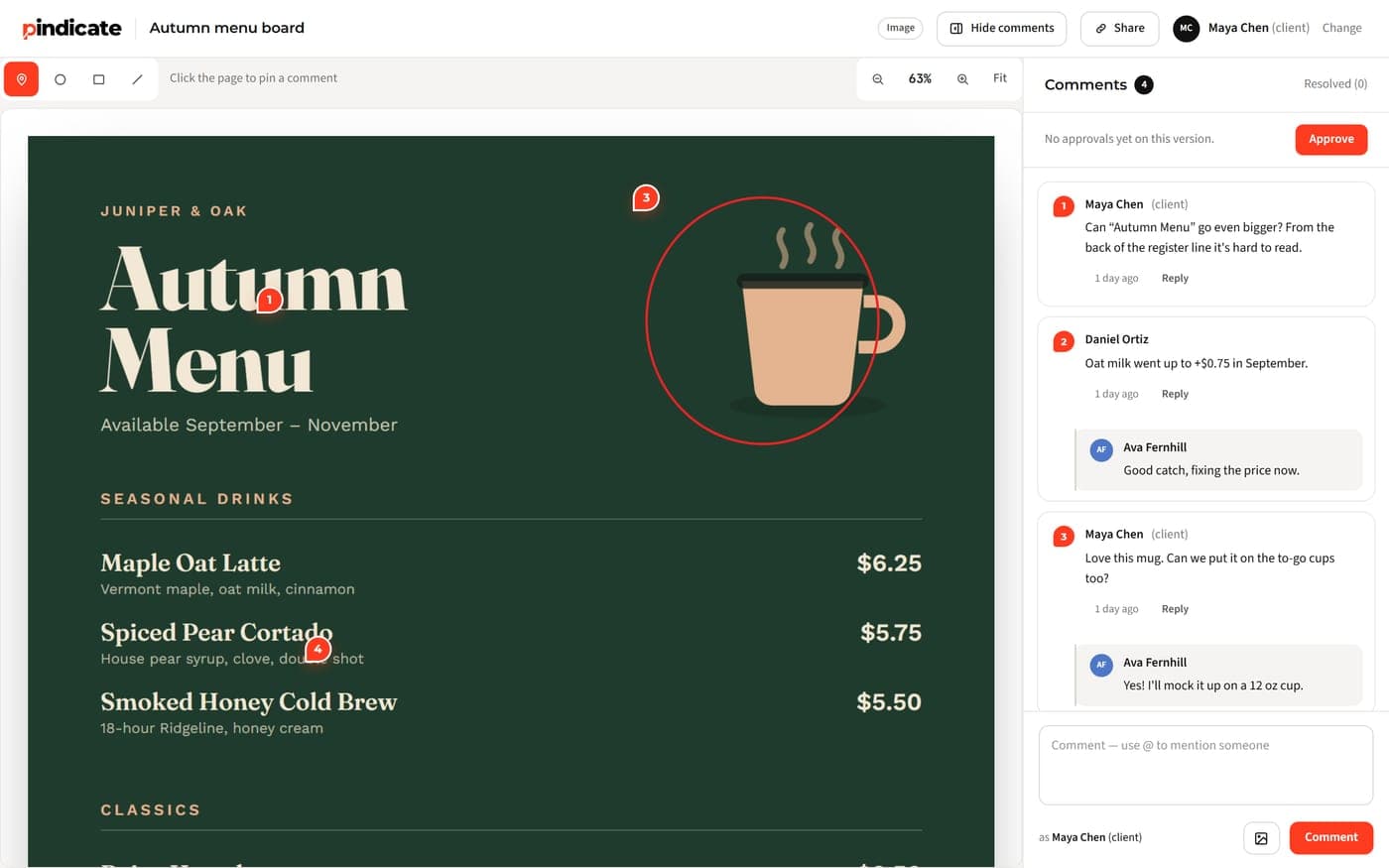
A client feedback tool for creative work. Clients pin comments on video, audio, images, PDFs, websites, HTML, docs, slides and email. No login needed.
Table of contents
- What is a client feedback tool?
- Why do email and Slack slow down revisions?
- How does Pindicate work?
- What can you send for review?
- Built for the person giving the feedback
- How do clients approve work in Pindicate?
- How do you choose a client feedback tool?
- Who is Pindicate for, and who isn't it for?
- What does Pindicate cost?
- Frequently Asked Questions
- Send your first link free
TL;DR: Pindicate is a client feedback tool for creative work. You upload video, audio, images, PDFs, websites, HTML files, docs, slides or emails, send one link, and your client pins comments on the exact spot or second. Clients never make an account. It isn't a survey tool, and the free plan covers 3 active reviews at a time.
Key takeaways
- Pindicate collects feedback on the work itself, not opinions about your service.
- Three steps: upload, send one link, read pinned comments.
- It handles video, audio, images, PDFs, websites, HTML files, Word docs, Google Docs and Slides, and emails.
- Clients type their name and comment. No login, no app.
- Free for 3 active reviews. Pro is $12 a month for approvals, versions and reminders.
"Can the thing at the top be bigger?"
That was the whole email. Which thing? The logo, the headline, the photo? And how much bigger?
You know how this goes. You guess, you send a revision, and the reply says "not that one." Now you're on round three of a two-round project.
A client feedback tool fixes this by moving the conversation onto the work. When your client points at the exact spot, there's nothing left to decode.
I built Pindicate because I was stuck in that inbox. I had projects going for several clients at once. Feedback came in through email, Slack and WhatsApp, and there was no one place to collect it or get a final approval.
It went the other way too. Clients wanted to send me their own work and get my review.
I wanted one place to share a project, get the review, make the changes and get a clear yes. It had to be dead simple for clients. What I found was either missing pieces or split across three tools. So I built it.
If you'd rather see it than read about it, send your first link free. No signup needed.
What is a client feedback tool?
A client feedback tool collects your client's notes on your work in one place. For creative work, each comment is attached to the exact spot, page or moment it's about.
Key Insight: "Client feedback tool" means two different things online. Survey tools (NPS scores, satisfaction forms) ask clients how they feel about your service. Visual feedback tools let clients comment on the work itself. Pindicate is the second kind.
Survey tools are good at their job. If you want a rating after a project wraps, use one. They just can't tell you the price on line two of the menu is wrong.
Visual feedback tools answer a different question: what exactly should change? The client clicks on the thing, types the note, and you get a pin on that spot. That's the kind this post is about.
Why do email and Slack slow down revisions?
Email and chat strip the location out of feedback. The client has to describe a spot in words, and you have to guess which spot they meant.
Comments lose their location
"The logo feels small" could mean the header, the footer or the favicon. Without a location, you either ask again and wait a day, or guess and risk another round.
Notes arrive in five places
One person emails. Another drops a note in Slack. The owner sends a voice memo on WhatsApp at 10 p.m. Two of the notes contradict each other, and you spend the morning merging them instead of designing.
You're not the only one dealing with this. A freelancer asking about approval workflows put it plainly:
"scattered feedback across WhatsApp and email. clients missing messages." A freelancer on r/content_marketing, "What's your workflow for client approvals? Mine is a mess" [verify quote wording and add username before publishing]
Video notes have no timestamps
"Something around the middle drags" is a classic video note. On a three-minute edit, "the middle" could be any of 90 seconds. You end up rewatching the whole cut to find it.
Watch Out: A vague note costs more than the time it takes to read. It costs a revision round you end up doing twice.
How does Pindicate work?
You upload your work, send your client one link, and read their comments pinned to the exact spot. The whole setup takes about a minute.
Step 1: Upload your work
Drop a file or paste a website link. You can put several files on one link and give each its own name. Your client sees "Menu board" and "Bag label" instead of "IMG_4471.png."
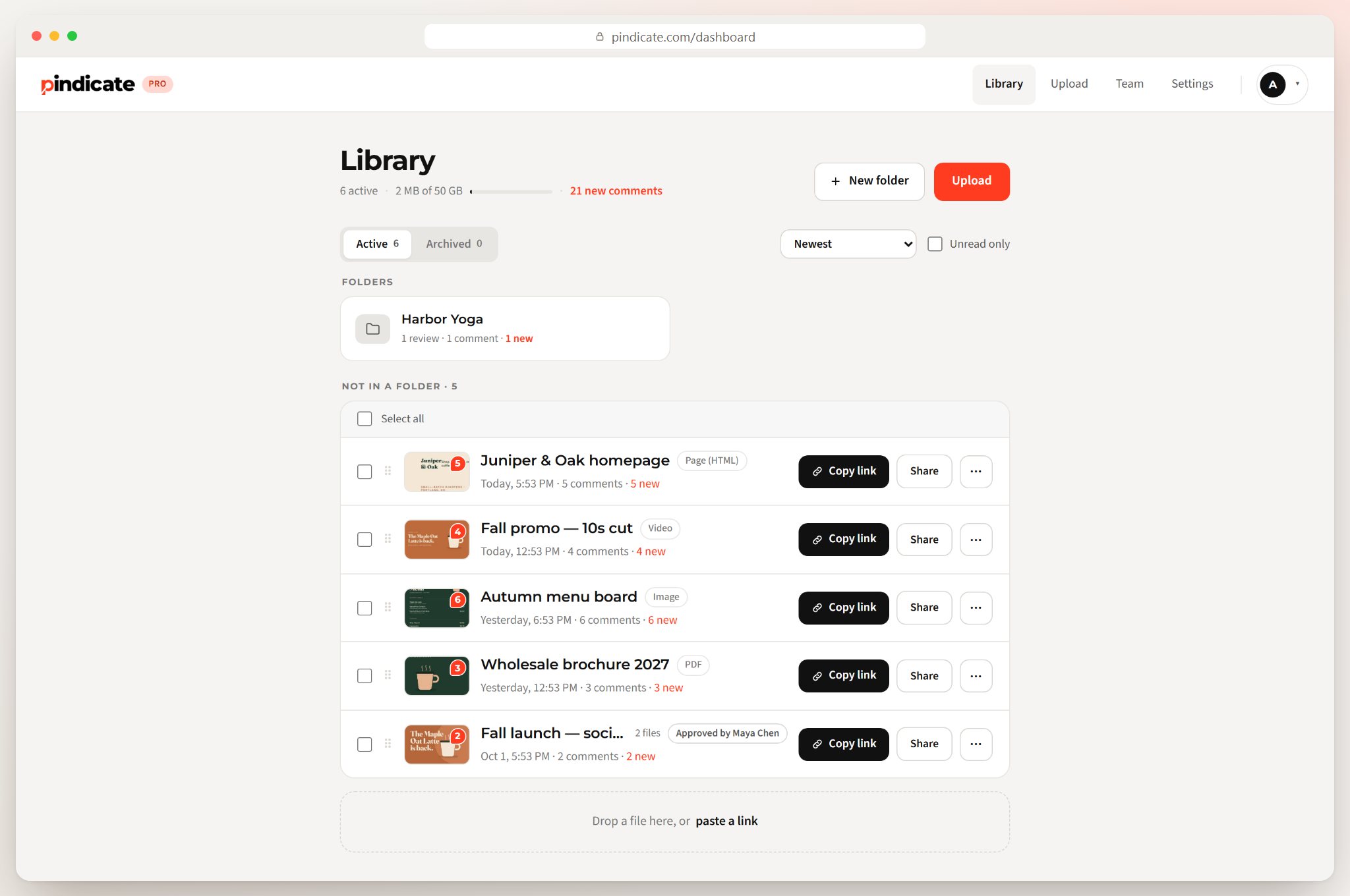
Your library shows every review, how many comments came in, and which ones are new since you last looked.
Step 2: Send one link
Copy the link, or email it straight from Pindicate. You can add a password, make a personal link for one client, or turn a link off instantly. Links don't expire.
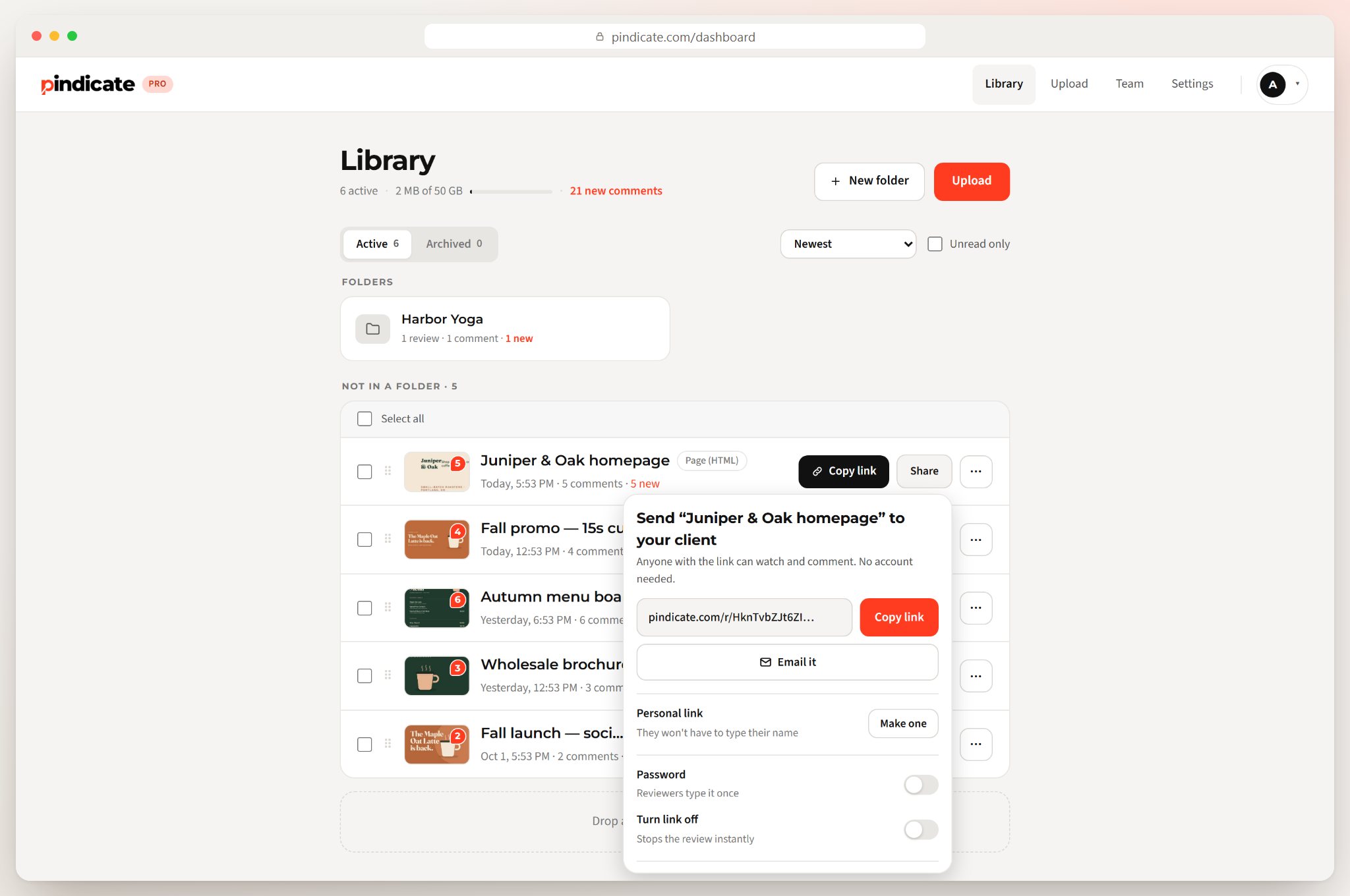
Pro Tip: Send a personal link to the person who signs off. Their comments arrive under their name without them typing it, so you always know whose call it is.
Step 3: Read pinned comments
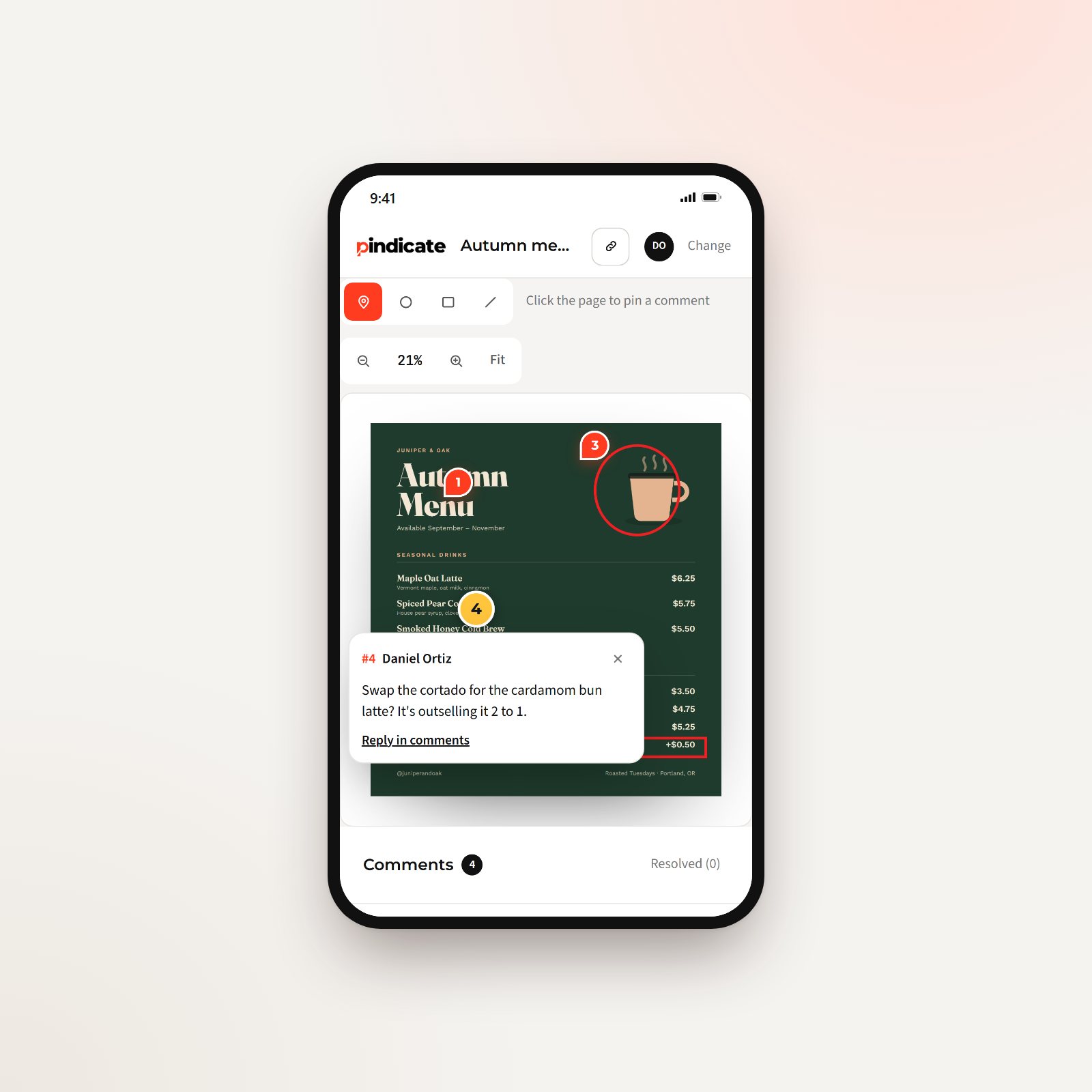
Every comment shows up as a numbered pin on the spot, page or second it's about. Clients can also circle or box an area when a pin isn't enough. You can reply on any comment, and everyone in that thread gets an email.
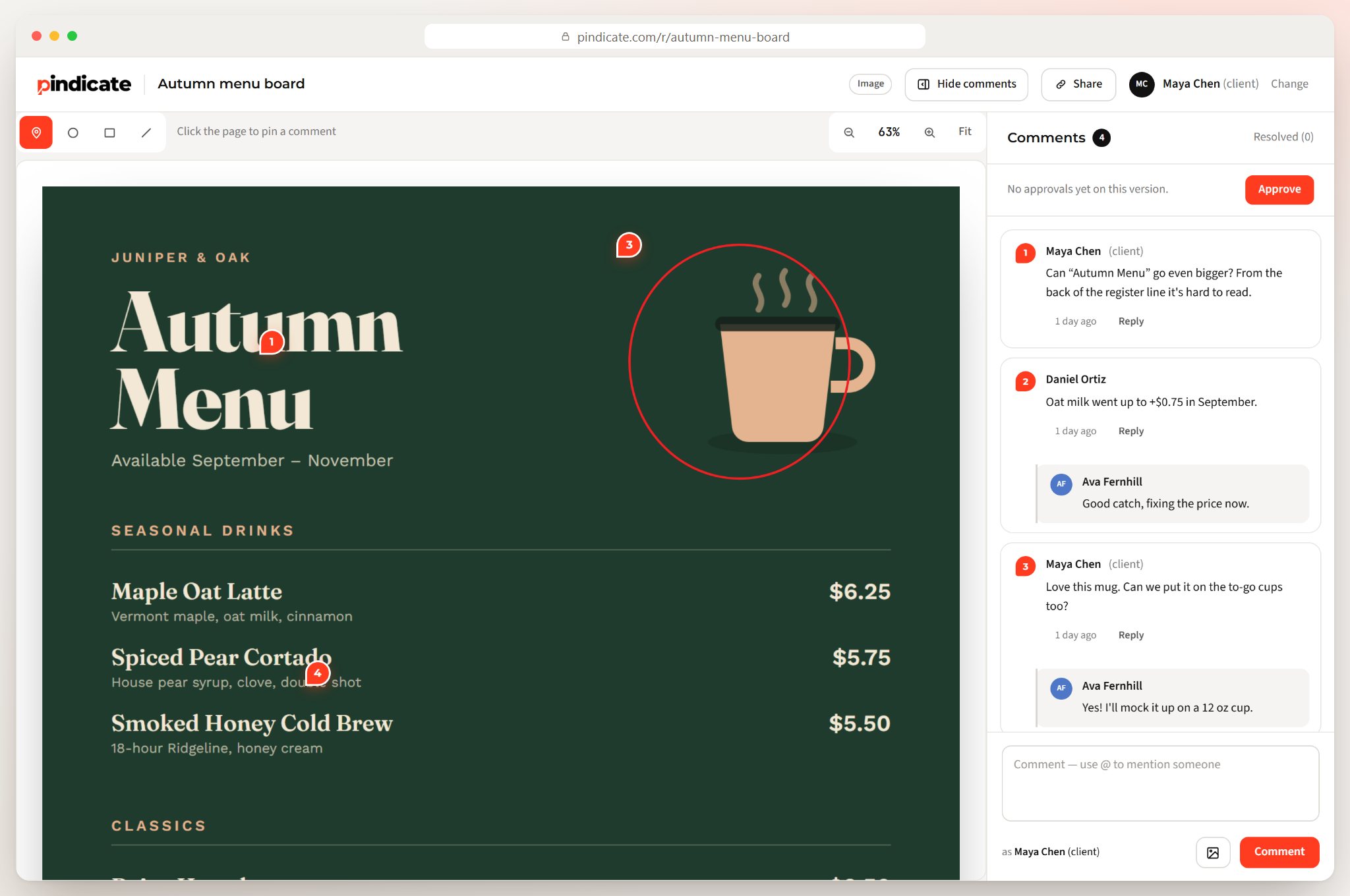
In the review above, someone flags that oat milk went up 75 cents. The designer replies "fixing the price now" right under the pin. Nobody forwarded an email, and nobody had to ask "which price?"
The fastest way to understand it is to be the client. Open the sample review and leave a comment yourself. It resets every night, so say whatever you want.
Try it with your own work: Upload a file on the homepage and you'll have a review link in about 10 seconds. Upload a file and get a link. No signup, no card.
What can you send for review?
Pindicate reviews video, audio, images, PDFs, websites, HTML files, Word docs, Google Docs and Slides, and emails. Your client comments the same way on all of them: click the spot, type the note.
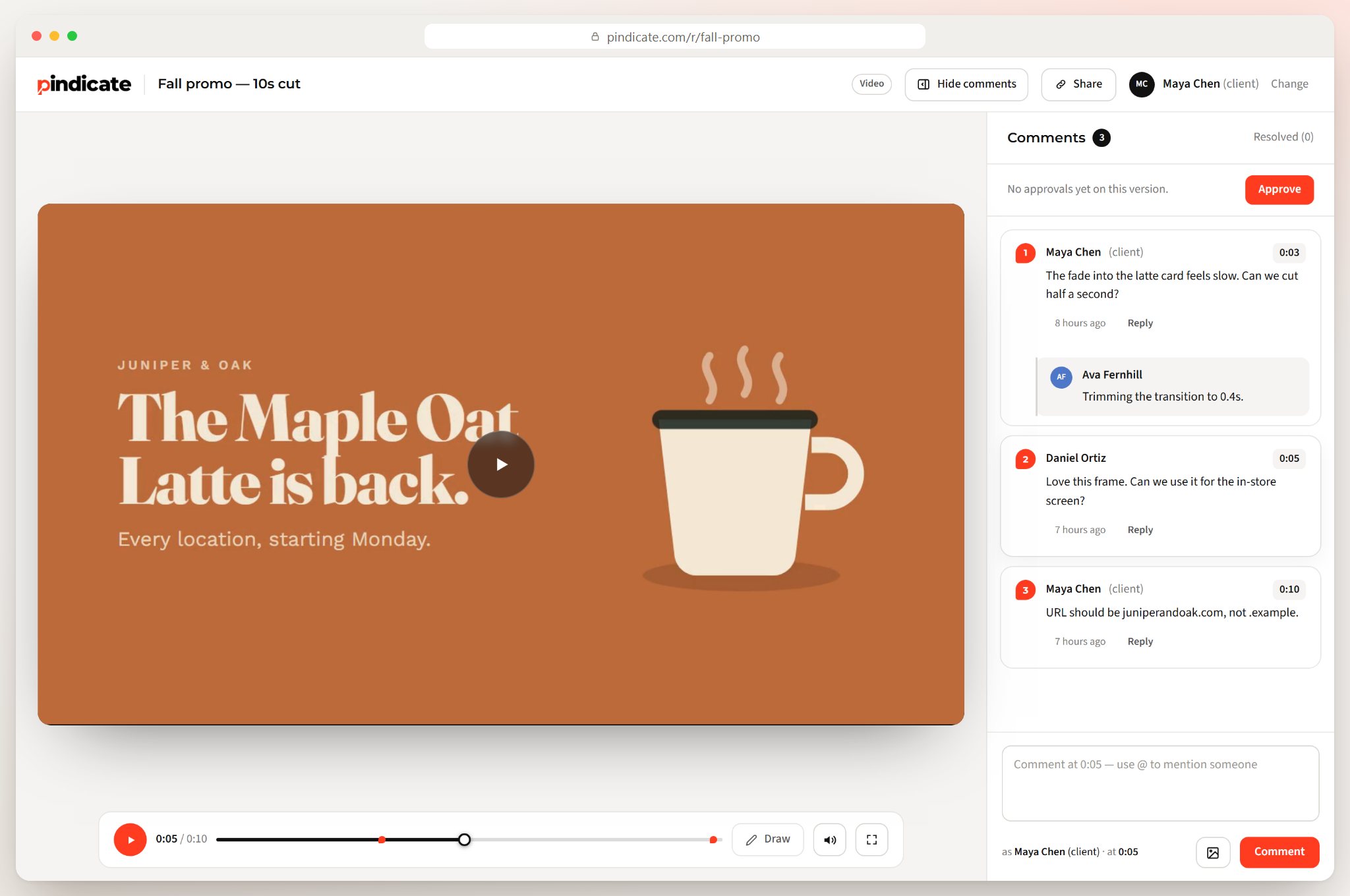
Video and audio
Comments land on the exact second. "Cut this pause at 1:42" beats "something drags" every time.
Images and designs
Clients drop a pin on the spot, or draw a circle, rectangle or line around it. Logos, social posts, packaging and menu boards all work.
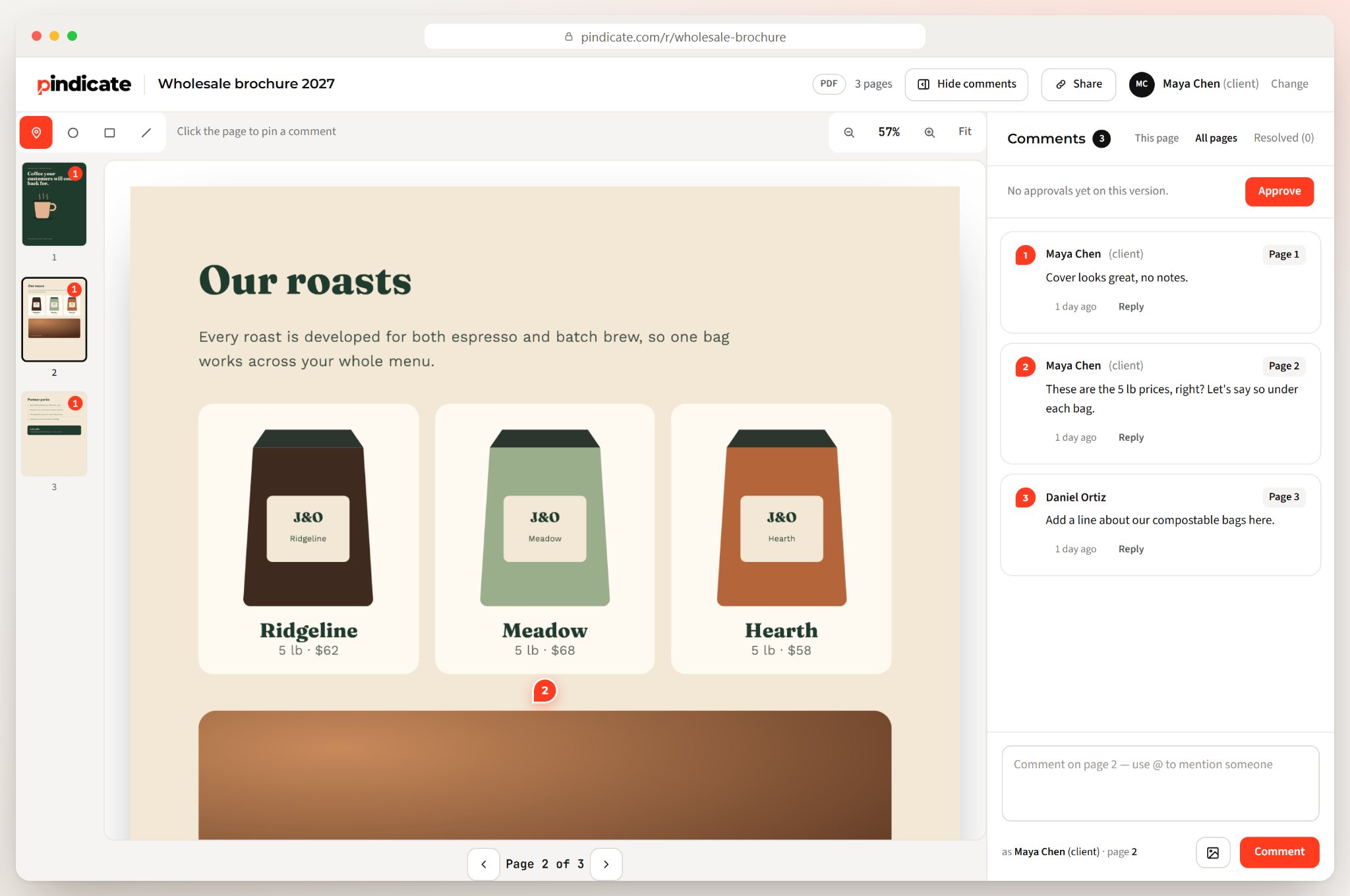
PDFs and slides
Each comment is tied to its page and the spot on it. That covers brochures, print proofs and pitch decks.
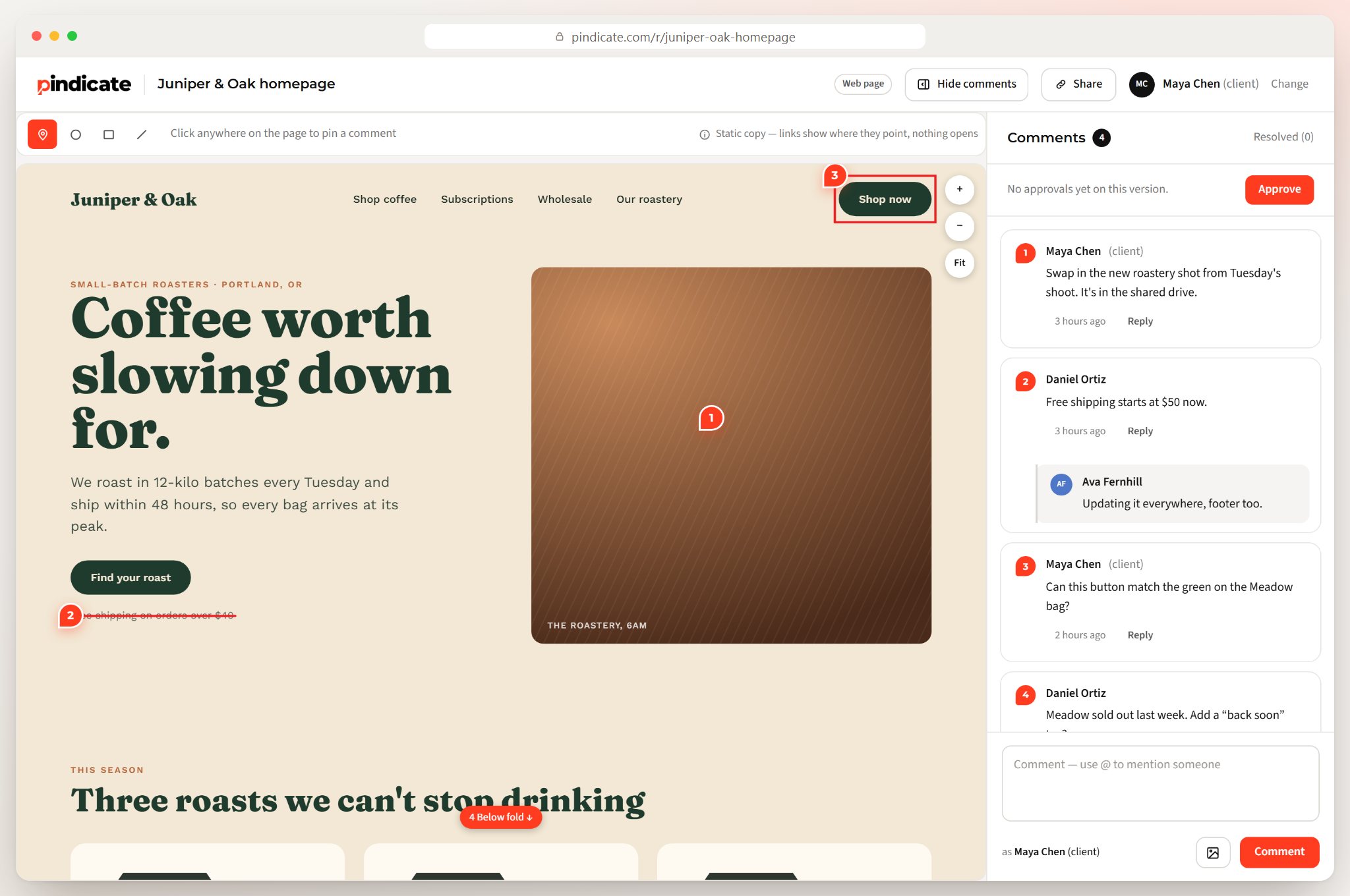
Websites and HTML files
Paste a URL or upload an HTML file. Clients click on the page itself, and each pin stays with the element they clicked.
Docs and emails
Word files, Google Docs and Slides, and email designs get the same pin-and-comment treatment. One tool covers the whole project, so the client learns it once.
Where the client's comment lands
| What you send | Where the comment lands |
|---|---|
| Video | The exact second |
| Audio | The exact second |
| Image or design | The exact spot, with optional drawing |
| PDF or slides | The page, and the spot on it |
| Website or HTML file | The element on the page |
Built for the person giving the feedback
Clients open the link, type their name and start commenting. There's no account, no app and nothing to install, so feedback doesn't stall at a login screen.
That matters more than any feature on your side. Your client is busy, and every extra step between "open link" and "leave comment" is a reason to reply by email instead.
- No signup. They type a name once. You can set a password if the work is private.
- Works on a phone. Clients can pinch to zoom and swipe, and the comment box opens right where they tapped.
- A short walkthrough shows first-time reviewers where to click.
It works both ways, too. A client can upload their own file on the Pindicate homepage, with no signup, and send you a link for your review. That was half of my original problem, and it's the same three steps from their side.
Reality Check: If your client has to create an account, a lot of them won't. They'll reply to your email with "looks good, small tweaks below," and you're back where you started.
How do clients approve work in Pindicate?
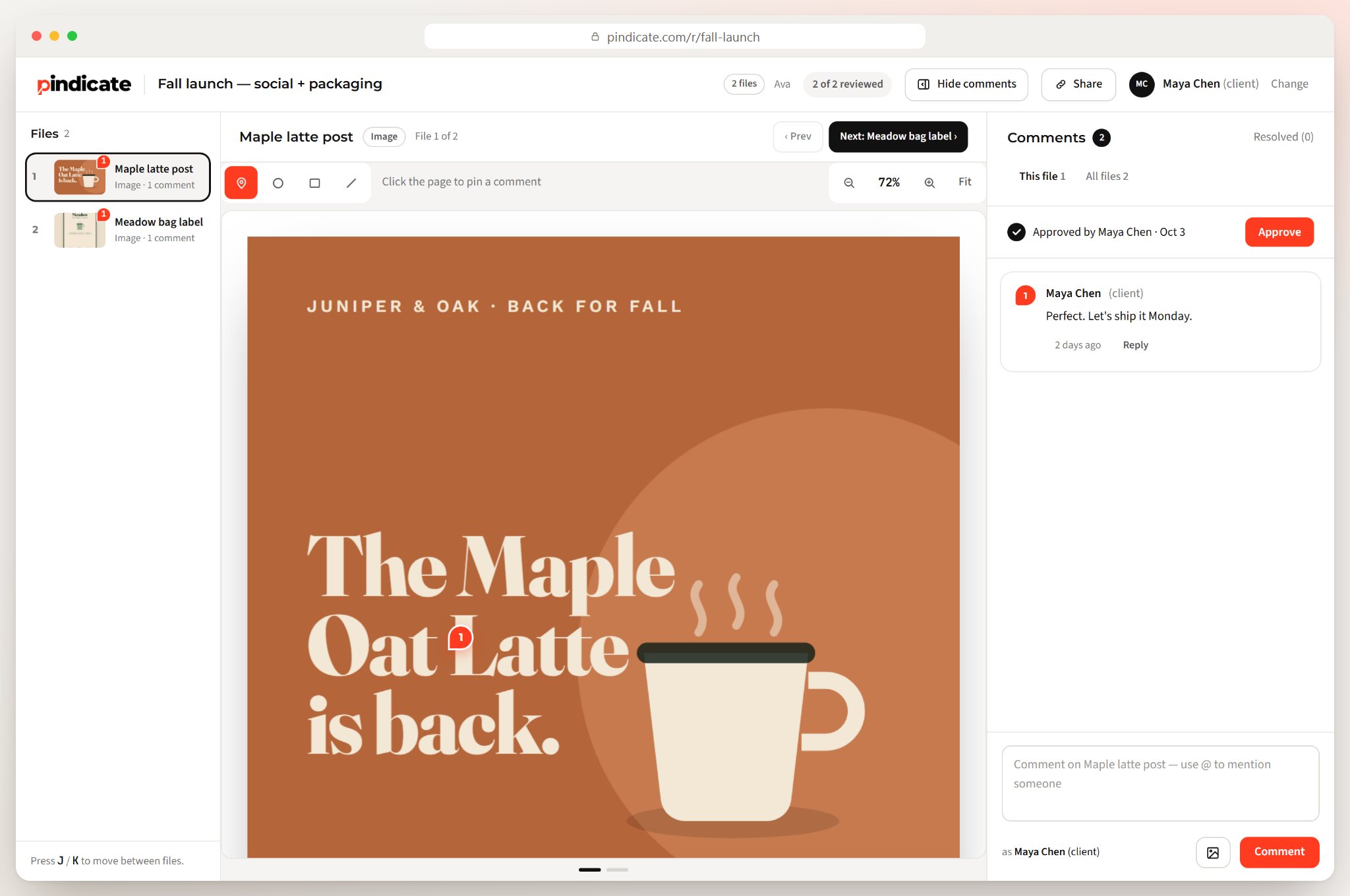
On Pindicate Pro, clients click Approve when they're happy. You get an email right away, and their name and the time are saved with that version.
Approvals in writing
No more digging through a thread for "looks good I think." The approval sits on the review with a name and a date. That ends any "I never signed off on that" conversation.
Versions on the same link
Upload round two to the same link. The link your client bookmarked still works, so there's no "which file is the latest?"
Reminders when a client goes quiet
If a named client hasn't responded, Pindicate sends a friendly reminder for you. Two nudges at most, and they stop as soon as the client comments or approves.
Pro Tip: Ask for approval only after every comment is resolved. A clear "approved" at the end of a round protects you when the scope changes later.
How do you choose a client feedback tool?
Pick the tool that matches where the feedback needs to land. For opinions about your service, use a survey tool. For notes on the work, pick a tool your client can use without making an account.
Questions to ask before you pick one:
- Does the client need an account?
- Does it handle every format you send?
- Can comments sit on a spot, a page or a timestamp?
- Can you get a written approval?
- Is the price flat, or charged per seat?
- Does it work on a phone?
| Email or Slack | Survey tools | Pindicate | |
|---|---|---|---|
| Built for | Conversation | Opinions about your service | Notes on the work |
| Where the note points | Described in words | Nowhere (a rating or form) | The exact spot, page or second |
| Client account needed | No | Usually no | No |
| Formats | Attachments | Not applicable | Video, audio, images, PDFs, websites, docs, email |
| Written approval | Buried in a thread | No | Yes (Pro) |
| Price | Free | Varies | Free plan; Pro $12/mo flat |
Email is fine for a one-line "approved." It falls apart the moment the client needs to point at something.
Who is Pindicate for, and who isn't it for?
Pindicate is for freelancers, studios and small agencies who send creative work to clients. It isn't a survey tool, a bug tracker or a full post-production suite.
A good fit:
- Video editors sending cuts for review
- Graphic designers working on logos, social posts and packaging
- Web designers getting sign-off on pages before launch
- Social media and marketing freelancers juggling several clients
- Small studios that want every client's notes in one library
Probably not a fit:
- You want NPS scores or satisfaction surveys. Use a survey tool.
- You need developer bug tracking with a browser extension and ticket integrations.
- You run a large post-production team that needs integrations with editing software.
What does Pindicate cost?
Pindicate is free for up to 3 active reviews at a time. Pro is $12 a month, or $96 a year, and your clients never pay on any plan.
| Free | Pro | |
|---|---|---|
| Price | $0 | $12/mo, or $96/yr |
| Active reviews | 3 at a time | Unlimited |
| Video size | Up to 250 MB | Up to 2 GB |
| Image or PDF size | Up to 25 MB | Up to 100 MB |
| Storage | 2 GB | 50 GB |
| Versions, approvals, reminders | No | Yes |
| Pindicate link on review pages | Small link at the bottom | None |
| Client accounts needed | Never | Never |
Teams that need something Pindicate doesn't do yet can ask about a Custom plan, priced on a call. You can also refer a friend for a free month of Pro, banking up to 12 months. See the plans for the full details.
Frequently Asked Questions
How can I get client feedback?
Send the work as one link and ask the client to comment on the exact spot they mean. A visual feedback tool like Pindicate pins each note to the spot, page or second, so nothing needs explaining. Ask one focused question per round, such as "Is the layout right?", and set a date you need comments by.
What are some great tools to manage client feedback?
It depends on what kind of feedback you need. For ratings and opinions about your service, survey tools work well. For feedback on creative work, use a visual feedback tool such as Pindicate. It keeps every comment on the file it's about, and on Pro the client can approve the final version.
Can clients leave feedback without signing up?
Yes. With Pindicate, clients open your link, type their name and start commenting. They never make an account, install an app or pay, on any plan. If you send a personal link, they don't even type their name. You can add a password if the work is private.
How do I get feedback from clients on a design?
Upload the design, send one link and ask one specific question, like "Does the headline read well from across the room?" The client pins comments right on the design and can circle the area they mean. You reply under each comment and mark it resolved once it's fixed.
What file types can I upload?
Pindicate takes video, audio, images, PDFs, websites (paste a URL), HTML files, Word docs, Google Docs and Slides, and emails. The free plan allows videos up to 250 MB and images or PDFs up to 25 MB. Pro raises that to 2 GB per video and 100 MB per image or PDF.
Is there free proofing software?
Yes. Pindicate's free plan gives you 3 active reviews at a time, with every file type and no client accounts. Archive a finished review to free up a slot. You can also try it without signing up: upload a file on the homepage and get a review link in about 10 seconds.
Send your first link free
They pin it. You fix it. Nobody has to guess what "make it pop" meant.
Upload a file on the homepage and you'll have a link in about 10 seconds. No signup, no card. Try Pindicate free with whatever you're working on today.
Want more first? Browse more guides on client feedback, or see the plans.